ATS Resume Optimization Guide 2026: Format, Keywords & Checklist
ATS Optimization · Sarah Johnson · May 5, 2026 · 12 min read

What Is ATS — And Why It Stands Between You and Your Dream Job
Every time you apply for a job online, your resume most likely passes through an Applicant Tracking System (ATS) before a single human being reads it. ATS software automatically collects, parses, ranks, and filters every application — and over 70% of resumes never make it past this first filter.
In 2026, the stakes are higher than ever. With the rise of AI-assisted hiring, economic uncertainty driving more applicants per posting, and platforms like LinkedIn making one-click applications the norm, recruiters at Fortune 500 companies now receive 250+ applications per role on average. ATS is no longer a big-company luxury — it's used by organizations of all sizes to survive the volume.
The good news? Once you understand how ATS actually works, beating it is straightforward. This guide covers everything you need to know — from the science of ATS parsing to platform-specific tips, keyword strategy, AI-powered self-checks, and the biggest myths that are costing you interviews.
How ATS Actually Works in 2026
Step 1: Parsing — Breaking Down Your Resume
When you submit your resume, the ATS first parses it — extracting text and categorizing it into fields like contact info, work experience, education, and skills. This is where formatting errors cause the most damage. If your resume uses tables, multi-column layouts, or stores data in headers/footers, the parser can misread or drop entire sections.
Modern ATS platforms use a combination of rule-based parsing and machine learning. Here's what the major platforms struggle with:
- Greenhouse: Headers, tables, graphics, incomplete job titles, large files
- Workday: Multiple columns, graphics, non-standard heading text
- iCIMS: Images, graphics, symbols, atypical fonts
- Lever: Acronyms, tables, and graphics
- SAP SuccessFactors: Scanned PDFs (image-based files)
- Oracle Taleo: Double and triple column layouts
If you know which ATS a company uses (often visible in job portal URLs or mentioned on Glassdoor), you can tailor your formatting accordingly.
Step 2: Ranking — How Your Score Is Calculated
Once parsed, the ATS calculates a match score by comparing your resume against the job requirements programmed by the recruiter. This scoring considers:
- Presence of required skills and keywords
- Job title alignment
- Years of experience in relevant roles
- Education level and field
- Location (for non-remote roles)
Modern systems like Workday and Greenhouse also use Natural Language Processing (NLP) and Named Entity Recognition (NER). This means if you write "increased customer satisfaction scores by 22%," the ATS can infer customer service skills without you explicitly listing "customer service." That said, older legacy systems — common in enterprise companies — still rely on exact keyword matching, so it's safest to cover both.
Step 3: Knockout Questions
Before your resume score even matters, many ATS platforms present knockout questions — short yes/no filters that eliminate candidates who don't meet baseline requirements. Examples:
- "Are you legally authorized to work in the US?"
- "Do you have a valid PMP certification?"
- "Are you willing to work on-site in Chicago?"
If you don't meet these, no amount of resume optimization will save your application. Always read the full job description before applying.
7 ATS Optimization Strategies That Actually Work in 2026
1. Use Reverse-Chronological Format — Always
The reverse-chronological resume format is the gold standard for ATS. It puts your most recent and relevant experience first — exactly what both the ATS and the recruiter want to see. Functional resumes (skills-first, work history buried) confuse most ATS because they don't anchor skills to specific time periods or employers.
Use a single-column layout with clear visual hierarchy: name at top, then summary, skills, experience, education. This structure is universally understood by every major ATS platform.
2. Nail Your Section Headings
ATS looks for specific labels to categorize your content. If you use creative headings, it may misclassify or skip your information entirely. Use these standard headings — and nothing else:
- Work Experience or Professional Experience
- Education
- Skills or Core Competencies
- Summary or Professional Summary
- Certifications
- "My Story," "Where I've Been," "Expertise Hub," "Career Highlights"
3. Master Keyword Strategy — Quality Over Quantity
One of the most persistent myths about ATS is that stuffing your resume with keywords improves your score. It doesn't — and it makes your resume unreadable to the human who sees it next. Here's how to handle keywords correctly:
Step 1: Mine the job description. Read it carefully and note every skill, tool, certification, and qualification listed — especially under "Required" sections.
Step 2: Match at the phrase level. Use the exact phrasing from the job description where it accurately reflects your experience. If the posting says "project management," don't just write "managed projects."
Step 3: Place keywords in context. Include keywords in your summary, work experience bullets, and skills section. ATS assigns more experience weight to skills mentioned within dated job entries than in a standalone skills list.
Step 4: Include both acronyms and full terms. Write "Search Engine Optimization (SEO)" to capture both versions. This is especially important for certifications like "Project Management Professional (PMP)" or "Certified Public Accountant (CPA)."
Step 5: Don't over-repeat. Mentioning a key skill 2–3 times across your resume is optimal. More than that looks unnatural to human reviewers.
4. Format for Parsability
Even the best content gets lost in a poorly formatted resume. Here are the specific formatting rules that protect your application from being garbled:
- No tables or text boxes: ATS often reads these left-to-right instead of top-to-bottom, scrambling your content
- No headers or footers: Contact information placed in Word headers/footers is missed by 25% of ATS scans (TopResume, 2024)
- No multi-column layouts: Even if they look clean, they cause parsing errors in Workday, Oracle, and others
- No images, logos, or graphics: These either get converted to garbled characters or trigger a "corrupt file" flag
- Standard fonts only: Arial, Calibri, Georgia, Lato, or Times New Roman at 10–12pt body text
- Simple bullet points: Solid circles (•) or squares (▪) — avoid decorative symbols
- 1-inch margins: Anything narrower looks cluttered; anything wider wastes space
5. Choose the Right File Format
The file format debate has evolved. Modern ATS can generally read both PDF and .docx with high accuracy — research shows a 96.7% parsability rate for standard text-based PDFs. However:
- Use .docx if the job posting doesn't specify a format — it's universally safe across old and new ATS
- Use PDF if the employer specifies it, or if you want to preserve precise visual formatting for human review
- Never submit an image-based PDF (scanned documents) — these are completely unparseable
- Never submit .pages, .odt, or .rtf unless explicitly asked
6. Write a Keyword-Rich Professional Summary
Your professional summary is prime ATS real estate. It's the first text the system reads and helps establish your overall relevance score. A strong 3–4 sentence summary should:
- Open with your job title (matching the role you're applying for)
- Include your years of experience and key domain
- Mention 2–3 hard skills pulled directly from the job description
- Close with a measurable achievement or specific value proposition
Example (for a Data Analyst role):
"Data Analyst with 5+ years of experience in business intelligence and reporting for e-commerce environments. Proficient in SQL, Python, and Tableau; experienced building dashboards that reduced reporting time by 40%. Skilled in A/B testing, cohort analysis, and cross-functional collaboration with product and engineering teams."
7. Include a Tailored Skills Section
A dedicated Skills or Core Competencies section lets ATS quickly surface your technical capabilities. Best practices:
- List both hard skills (tools, languages, platforms) and soft skills (leadership, communication)
- Mirror the exact language from the job description for hard skills
- Keep it scannable — 8 to 16 skills maximum, using short bullet points or a simple comma-separated list
- Update this section for every application, prioritizing skills from the specific job posting
4 ATS Myths That Are Hurting Your Job Search
Myth #1: "I need a 100% ATS score to get noticed"
Reality: No such threshold exists. ATS scores are relative — your resume is ranked against other applicants for that specific role. A well-tailored resume with 70–80% keyword alignment will consistently outperform an artificially inflated one. Services that demand "perfect scores" are selling anxiety, not results.
Myth #2: "Put keywords in white text to trick the ATS"
Reality: This tactic was obsolete by 2020. Modern ATS and AI review tools detect hidden text. Using it will likely get your application flagged for fraud and permanently disqualified. Focus on genuine keyword alignment instead.
Myth #3: "AI is reading my resume and rejecting me automatically"
Reality: The AI inside most ATS functions as a data extraction librarian, not a human judge. It tags your experience with structured labels so recruiters can search and sort applicants. Only 6% of hiring managers report that AI can reject candidates without human review (ResumeGenius, 2026). A human almost always makes the final screening call.
Myth #4: "Two-column resumes always get rejected"
Reality: It depends on the ATS. Greenhouse and Lever handle two-column layouts better than older systems like Oracle Taleo. That said, single-column is universally safe. If you don't know which ATS a company uses, default to single-column.
How to Test Your Resume for ATS Compatibility
The Plain Text Test
Copy the full text of your resume and paste it into a plain text editor (Notepad on Windows, TextEdit on Mac). If:
- Your sections appear out of order → you have a multi-column or table formatting issue
- Some content is missing → it was in a text box, header, or footer
- Special characters are garbled → your font or bullet symbols aren't ATS-safe
A resume that looks clean in plain text is one an ATS can parse correctly.
The AI Self-Check (ChatGPT / Gemini)
Paste your resume and the job description into ChatGPT or Gemini and ask: "Estimate what ATS score this resume would receive for this job description. List missing keywords and suggest specific improvements." This is free, fast, and surprisingly accurate for identifying gaps before you apply.
Use a Dedicated ATS Checker
The most reliable approach is to run your resume through a purpose-built ATS resume checker that analyzes keyword match, formatting issues, and section completeness against a specific job description. Our free ATS resume checker does exactly this — upload your resume, paste the job description, and get an instant score with actionable recommendations.
ATS-Optimized Resume Template Structure (2026)
Here is the exact structure that works across all major ATS platforms:
[Full Name]
[City, State] | [Phone] | [Email] | [LinkedIn URL]

PROFESSIONAL SUMMARY
3–4 lines. Job title + years of experience + 2–3 key skills + one achievement.

CORE COMPETENCIES / SKILLS
Skill 1 • Skill 2 • Skill 3 • Skill 4 • Skill 5 • Skill 6

PROFESSIONAL EXPERIENCE

Company Name | Job Title                                    MM/YYYY – MM/YYYY
• Achievement-focused bullet with numbers (e.g., "Reduced churn by 18%")
• Keyword-rich bullet mirroring the job description
• Quantified impact wherever possible

[Repeat for each role, most recent first]

EDUCATION
Degree, Major | University Name | Year

CERTIFICATIONS (if applicable)
Certification Name (Acronym) | Issuing Body | Year
Bonus: Optimizing Your Cover Letter for ATS
Many job seekers don't realize that cover letters are also processed by ATS in many systems. Apply the same keyword discipline to your cover letter:
- Include the exact job title in the opening paragraph
- Mirror 3–4 key requirements from the job description naturally in your first two paragraphs
- Use the same clean, simple formatting — no fancy headers, no tables
- Submit as .docx or PDF, matching whatever format you used for your resume
A well-optimized cover letter can boost your overall ATS match score and give you an edge over candidates who skip it.
2026 ATS Checklist: Before You Hit Submit
- ☑ Single-column layout with clear visual hierarchy
- ☑ Standard section headings (Work Experience, Education, Skills, Summary)
- ☑ Contact info in the body — not in header or footer
- ☑ No tables, text boxes, or graphics
- ☑ Standard font (Arial, Calibri, Georgia) at 10–12pt
- ☑ Keywords from job description included in summary, experience, and skills
- ☑ Both acronyms and full terms for all certifications and tools
- ☑ File saved as .docx or text-based PDF
- ☑ Plain text test passed
- ☑ ATS score checked with a dedicated tool
Key Takeaways
- Over 70% of resumes never reach a human recruiter because of ATS filtering — optimization is essential, not optional
- ATS parses your resume first, then ranks it against job requirements — formatting errors kill your score before keywords are even evaluated
- Use reverse-chronological format, standard section headings, and single-column layout for maximum parsability across all major ATS platforms
- Focus on quality keyword alignment, not quantity — include exact phrases from the job description naturally in your summary, experience bullets, and skills section
- Modern ATS use NLP to infer skills from context, but older enterprise systems still rely on exact matching — cover both
- Test your resume with the plain text method and an ATS checker tool before every application
- ATS AI doesn't reject you — humans do, after reviewing ATS-ranked candidates
Questions
Frequently asked questions
Get Free ATS Tips Every Week
Actionable resume and ATS tips, when we publish them. No spam. Unsubscribe any time.
Related Articles

Shadow ATS Keywords: The Hidden Resume Terms Recruiters Search But Candidates Miss
A deep analysis of secondary and contextual resume keywords recruiters search for but candidates often miss, including title variants, adjacent tools, domain language, workflow terms, outcome metrics, and proof phrases that improve ATS and AI screening visibility.
Read More

The AI-Proof Resume: How to Write a Resume That Survives AI Screening in 2026
Most resumes are still written for old ATS keyword matching. In 2026, the stronger strategy is to build one resume that parses cleanly, ranks well in AI screening, convinces recruiters in a 30-second scan, and remains verifiable when hiring agents compare your resume against your public career footprint.
Read More

2026 Resume Trends: How to Beat the ATS and Quiet Hiring
Discover the critical 2026 resume trends required to navigate a hyper-competitive job market. Learn why aesthetic templates fail, how to optimize for modern Applicant Tracking Systems (ATS), and what strategies bypass the invisible hiring freeze.
Read More
Try it
Check this against your own resume
The post above is general. Your file is not. The checker reads it the way a parser would and tells you which of these points it actually breaks.
Check your resume free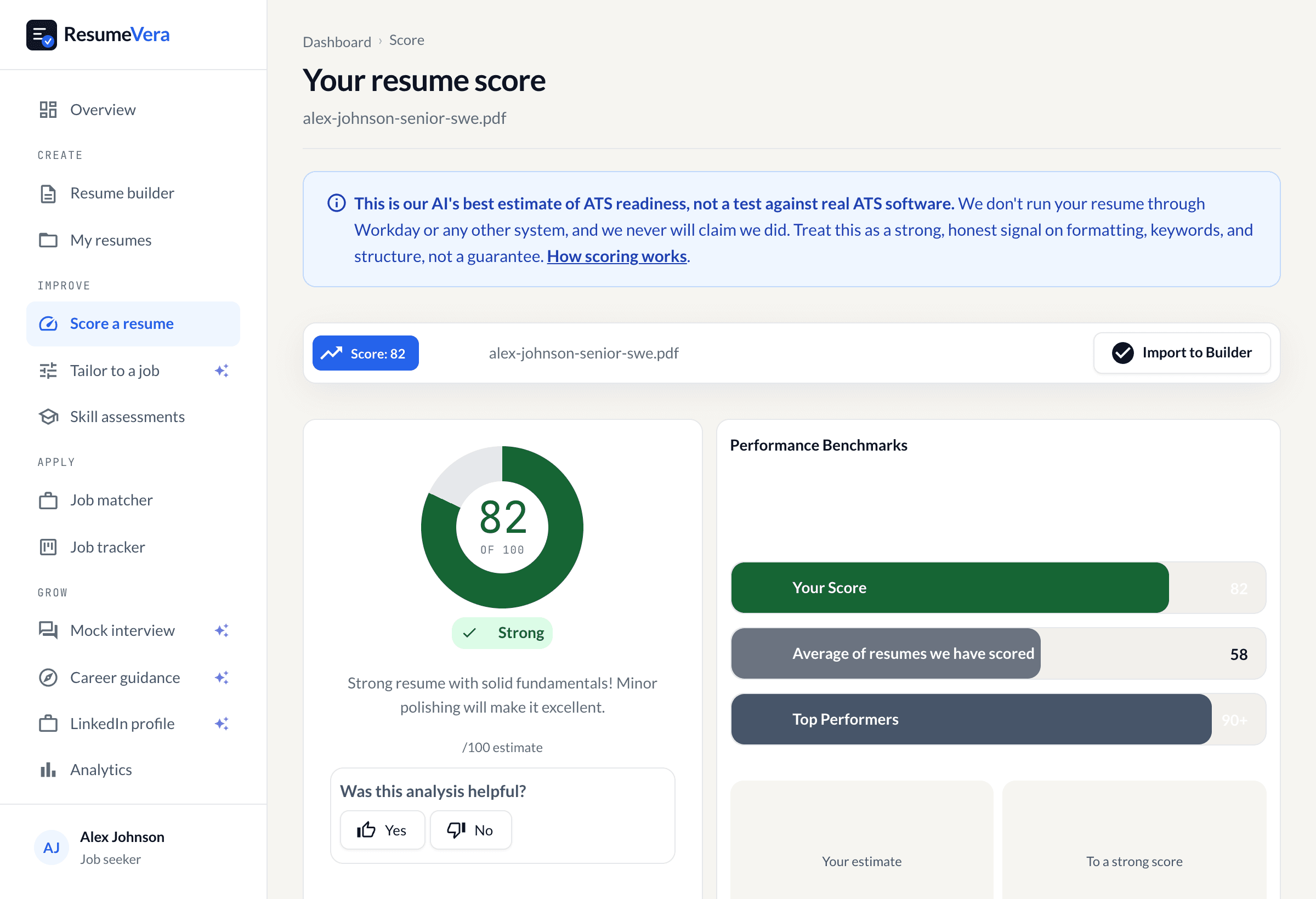
A sample resume in the real checker. The 82 and the sub-scores are what the scorer returns for it.
Now check it against your own resume
An honest, AI-estimated ATS score in 30 seconds. No account, no card.