Check your resume in seconds
A free structure score read straight from your file: how cleanly it parses, whether the standard sections are there, whether your contact details can be found, and how many of your lines show a result. It is an estimate, not a real ATS test.
Instant structure score, no account needed
Parse quality, sections, contact details and measured results
A free account adds the AI review of your content and keywords
Drop your resume here, or anywhere on this page
Drag and drop your file here, or click to browse
Supported formats: .pdf, .doc, .docx (Max 5MB)
Your data is never shared or sold. Resumes are used only for your analysis.
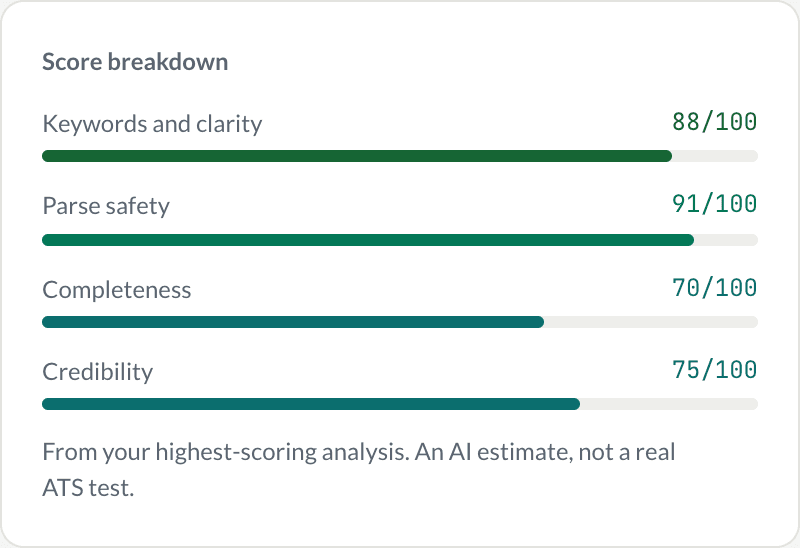
The real score card, with sample scores for a sample resume. The 70 on completeness is the point: it tells you where to look.
1,700+
Resumes analyzed5s
Median AI analysis time4 areas
Checked per resume100% free
No sign-up neededWhat you get
A score, and the reason for it
Not a grade and a shrug. Every finding names the thing it found and what to do about it, and the page says plainly that this is an estimate rather than a test against real ATS software.
Four categories
Parse quality, standard sections, contact details and quantified impact, each scored separately.
Specific findings
"Two roles have no dates" beats "improve formatting".
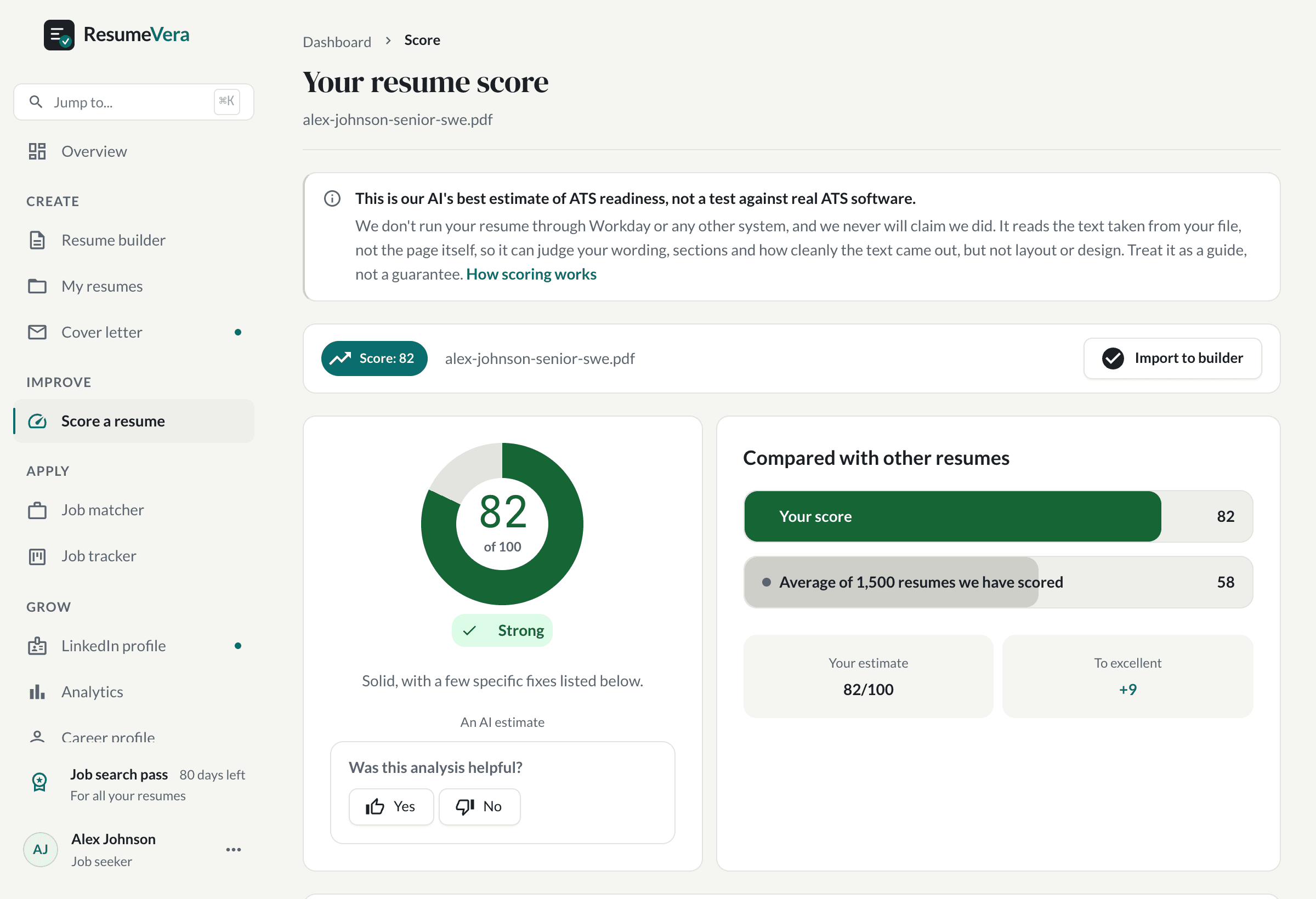
Alex is invented. The 82 is not: it is what our scorer gives that resume.
How our ATS resume checker works
Get your ATS compatibility score in 3 simple steps; no sign-up required.
1
Upload your resume
Upload in PDF or DOCX format (up to 5MB). Your data is never shared or sold.
2
AI scans your resume
Our AI checks formatting, keywords, sections and readability against the parsing rules these systems are known to apply. It is an estimate, not a run against a real ATS.
3
Get Actionable Fixes
See your ATS score plus specific recommendations: missing keywords, formatting issues, and what to fix first.
What ResumeVera checks
Four dimensions that determine whether your resume reaches a recruiter. Every score is an AI estimate based on ATS best practices, not a test run through a specific employer's ATS. How scoring works.
ATS Compatibility
Is your resume built with the clean, single-column formatting that systems like Workday, Greenhouse, and Taleo parse reliably? Tables, columns, and text boxes often cause silent failures.
Keyword Density
Are the right industry keywords and job-title phrases present? ATS ranks resumes against the job description, missing keywords = lower score.
Content & Impact
Strong action verbs, quantified results, and clear achievements that signal a strong candidate to both ATS and human reviewers.
Formatting & Structure
Clean layout, correct section order, ATS-safe fonts, and no hidden traps like contact info in headers or footers.
What can trip up a parser
Formatting choices that make a resume harder for software to read. Each one takes a few minutes to fix.
Multi-column layouts
Some parsers read across columns rather than down them, so a job title can land next to an unrelated skill. One column reads the same everywhere.
Different words from the posting
Recruiters often search their applicant tracking system by keyword. If you describe a skill in different words from the posting, you are harder to find.
Creative section headings
"My journey" instead of "Experience" can leave a parser unsure where your work history starts. Standard headings are the safer choice.
Contact details in the header
Some parsers skip page headers and footers. Put your name, email and phone in the body of the page.
PDFs saved as images
A PDF exported as a picture has no text for software to read. Export a text-based PDF or a Word file instead.
Mixed date formats
Mixing "Jan 2022" with "2022-01" makes dates harder to read, for software and people alike. Pick one format.
What your ATS score means
What each score band means for your resume, and where to start fixing it.
91–100
Clean structure, complete sections and strong keyword coverage. Little left to fix before you apply.
76–90
Solid and readable. A few keyword additions or small formatting fixes should lift it further.
61–75
A workable base. Keyword coverage and measurable results are usually what is holding it back.
41–60
Gaps in structure, keywords or detail that make the resume harder to read, for software and for people.
0–40
Significant formatting or content problems. Start with the fixes marked critical in your report.
Resume checker for every role and industry
The same checks apply to every role and every market. What changes is which keywords matter.
Software Engineer
Use exact technology names from the JD (React, not just "frontend"). GitHub and open-source contributions are strong ATS signals.
Data Analyst / Data Scientist
List tools explicitly: Python, SQL, Tableau, Power BI. Quantify impact, "reduced reporting time by 40%" scores higher than "improved reports".
MBA / Management
Include: P&L, stakeholder management, cross-functional, go-to-market. Scope ("team of 12", "$2M budget") ranks higher than generic leadership language.
Entry level and new grads
A parser reads internships, projects and coursework exactly as it reads a job. List every tool you actually used, in a Skills section, spelled the way the posting spells it.
Finance and accounting
Name certifications exactly: CPA, CFA, ACCA, CMA. Name the software too: SAP, NetSuite, QuickBooks, Excel. Exact certification strings are among the highest-weighted matches a parser makes.
Marketing & Growth
Include channel keywords: SEO, SEM, CRO, Google Analytics, Meta Ads. Use metrics: CTR, ROAS, CAC, LTV. Generic "marketing experience" will not rank.
Why job seekers choose ResumeVera
1,700+ resumes analyzed, and a score you can see without making an account.
No sign-up needed
Upload your resume and see your score without making an account.
A score in seconds
The AI analysis typically takes about 5 seconds, measured across real scans.
Specific fixes, not just a score
We tell you exactly which keywords are missing, which sections need fixing, and what to change first.
Honest about what it is
The score is an AI estimate, not a real ATS test, and we say so on the result rather than burying it in an FAQ.
What 28 points of difference looks like
These are the two sample resumes our own scorer rates 54 and 82. Nothing was rewritten to sound better; the second one is the first one with its structure fixed.
82
of 100
- Two-line summary naming the role
- Every role dated, month and year
- Skills as a comma-separated list
- Four bullets in nine carry a number
Drag to compare. Same person, same jobs, same words for the most part — the difference is structure.
Over time
Checking once tells you where you are. Checking again tells you if it worked.
Every score is kept, so the second one means something. The trend is the honest measure of whether an edit helped, and it is the reason the checker is worth coming back to rather than a one-off verdict.
Check your resume free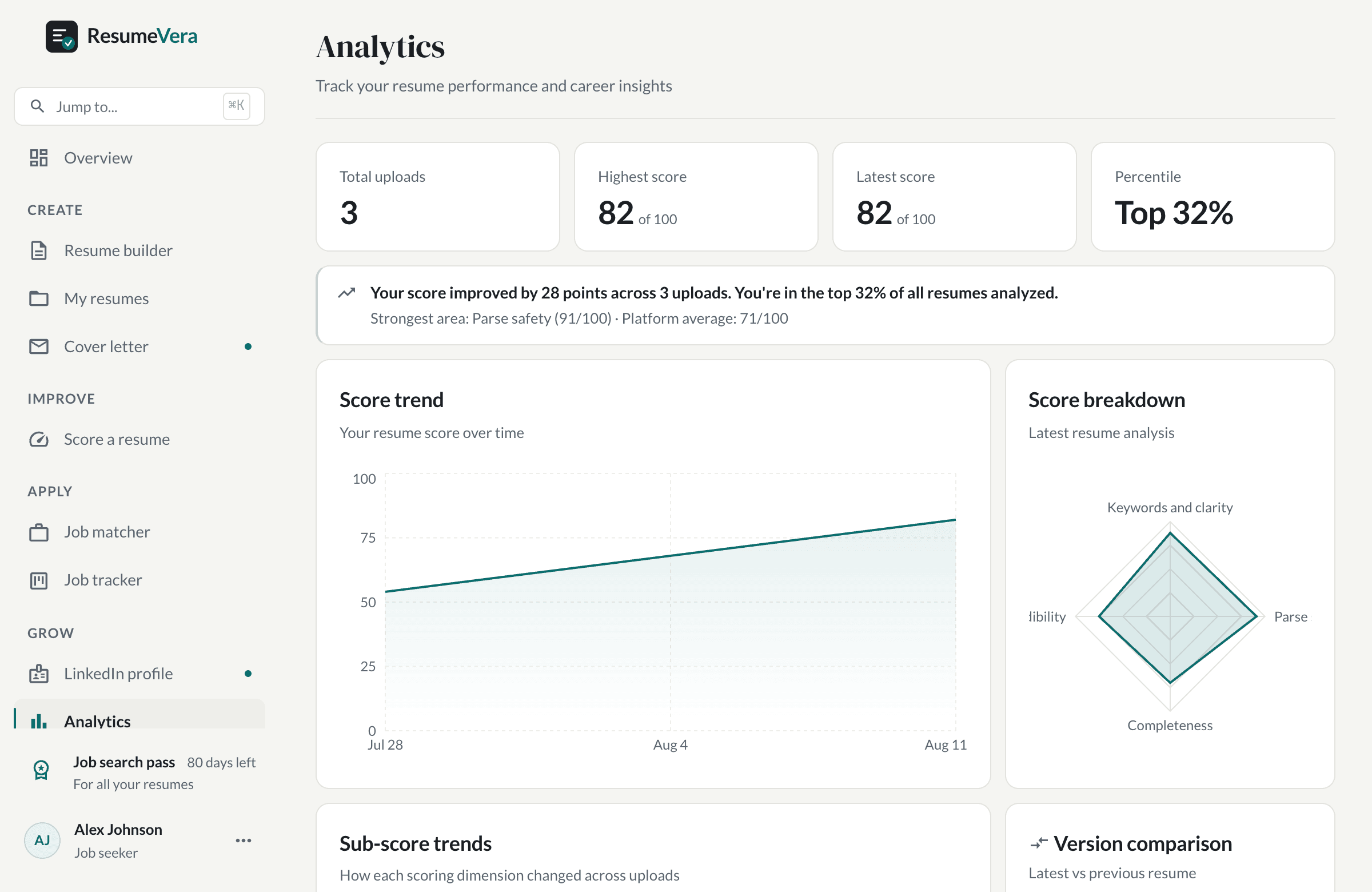
The real analytics page, showing a sample account’s history.
Questions
Frequently asked questions
Everything you need to know about ATS and our free resume checker.
Ready to check your resume?
An honest estimate in seconds. No account, no card, no subscription.
No card to start · One payment · Nothing renews