The Complete ATS Resume Guide (2026): Beat Applicant Tracking Systems
In today's competitive job market, understanding Applicant Tracking Systems (ATS) is no longer optional—it's essential. With most Fortune 500 companies using ATS software and Many resumes being rejected before reaching human eyes, optimizing your resume for these systems can be the difference between landing interviews and being overlooked.
This comprehensive guide covers everything you need to know about creating ATS-friendly resumes that pass automated screening while still impressing hiring managers.
What is an Applicant Tracking System (ATS)?
An Applicant Tracking System is software that automates the hiring process by collecting, sorting, scanning, and ranking job applications. Think of it as a digital gatekeeper that employers use to manage the overwhelming volume of applications they receive.
The History and Evolution of ATS
ATS technology emerged in the 1990s as companies needed better ways to manage increasing application volumes. What started as simple database systems has evolved into sophisticated AI-powered platforms that can:
- Parse resume content and extract relevant information
- Screen candidates based on keywords and qualifications
- Rank applicants according to match scores
- Automatically reject unqualified candidates
- Schedule interviews and send automated communications
Today's ATS platforms include Workday, Greenhouse, Lever, iCIMS, Taleo (Oracle), and many others—each with its own parsing algorithms and screening criteria.
Why Companies Use ATS
The average corporate job posting receives 250 applications. For recruiters handling multiple positions simultaneously, manually reviewing each resume is impossible. ATS software solves this by:
- Reducing screening time: From hours to minutes per position
- Improving compliance: Ensuring consistent evaluation criteria
- Centralizing data: Creating searchable candidate databases
- Enabling collaboration: Allowing hiring teams to share feedback
- Tracking metrics: Measuring time-to-hire and source effectiveness
How ATS Software Works: The Three-Step Process

Understanding how ATS evaluates resumes is crucial for optimization. The process typically involves three stages:
Step 1: Parsing and Data Extraction
When you submit your resume, the ATS first attempts to parse (read and categorize) the information. This involves:
Content Extraction: The system scans your document and attempts to identify key sections like contact information, work experience, education, and skills.
Data Categorization: Information is sorted into standardized fields within the ATS database. For example, your job titles, company names, and employment dates are extracted and stored separately.
Text Recognition: The ATS converts your resume into plain text, which is why complex formatting can cause problems. Tables, text boxes, and graphics often confuse the parser, leading to scrambled or missing information.
Step 2: Keyword Matching and Scoring
After parsing, the ATS compares your resume against the job description:
Keyword Analysis: The system searches for specific terms related to skills, qualifications, job titles, and industry terminology. If the job description mentions "Python," "Agile methodology," and "team leadership," the ATS looks for these exact phrases.
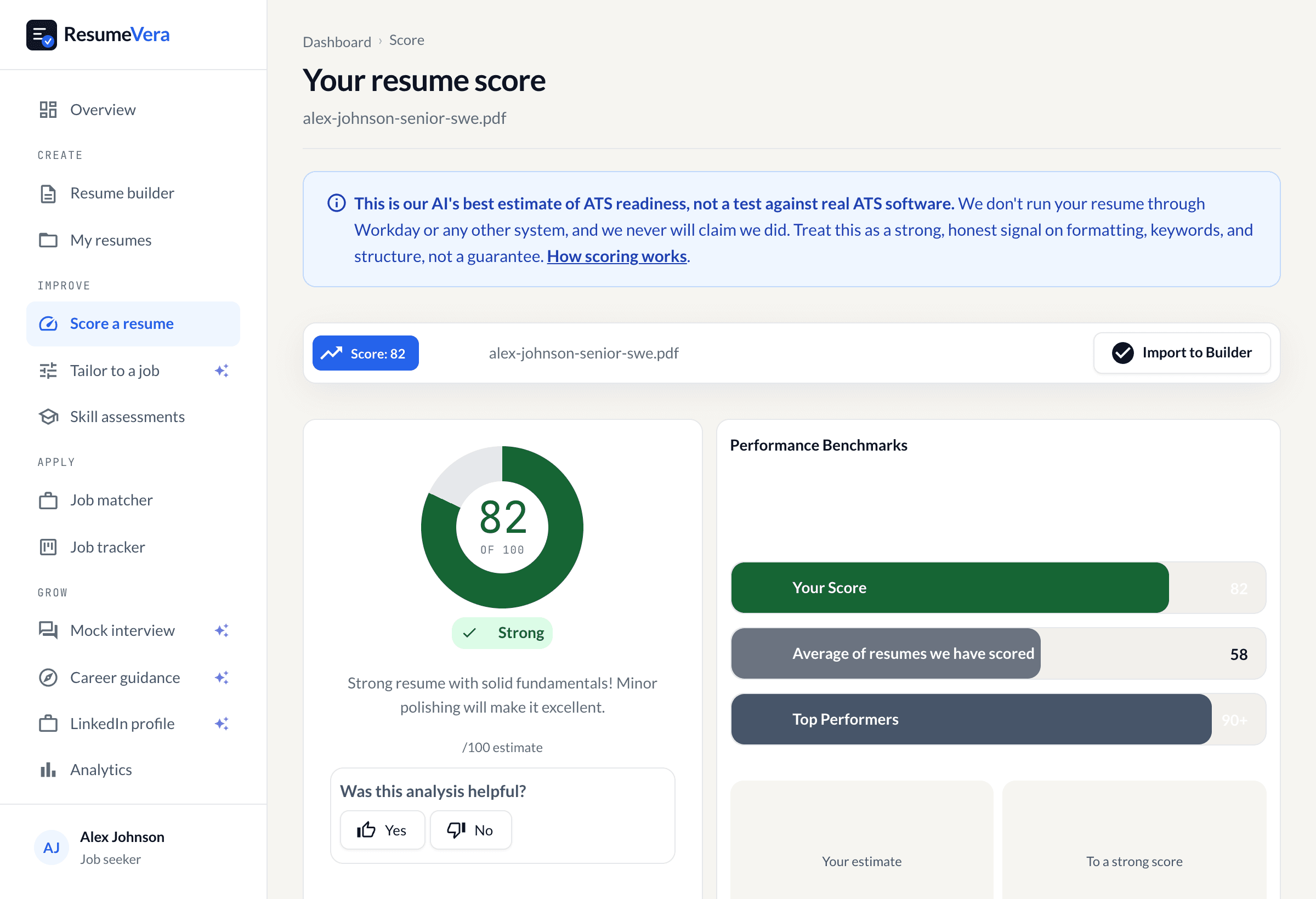
Match Score Calculation: Your resume receives a score based on how many required and preferred qualifications you meet. This score typically ranges from 0-100, with higher scores indicating better matches.
Boolean Logic: Some systems use AND, OR, and NOT operators to create complex search queries. For example: "(Python OR Java) AND (5+ years experience) NOT (entry-level)."
Step 3: Ranking and Filtering
Finally, the ATS ranks all applicants and presents the top candidates to recruiters:
Ranking, not deletion: most systems rank and surface candidates rather than discarding them. Some employers do configure hard filters, but those usually sit on specific answers such as work authorisation, not on a match percentage. There is no universal score below which a resume is thrown away.
Qualified Pool: The top 20-30% of applicants are typically forwarded to hiring managers for review.
Searchable Database: All resumes are stored in a searchable database, meaning recruiters can search for specific skills or qualifications when new positions open.
Essential ATS Optimization Strategies
Now that you understand how ATS works, let's explore proven strategies to optimize your resume for automated screening.
1. Strategic Keyword Integration
Identify Critical Keywords: Read the job description carefully and identify required skills, qualifications, certifications, and industry terms. These become your target keywords.
Use Exact Phrases: If the job description says "project management," use that exact phrase rather than "managed projects." ATS systems often look for exact matches.
Include Variations: Use both acronyms and full terms. For example, "Search Engine Optimization (SEO)" ensures you're found whether the ATS searches for the acronym or full phrase.
Natural Integration: Avoid keyword stuffing. Instead, incorporate keywords naturally throughout your work experience, skills section, and professional summary. Context matters—"Led Python development projects" is better than just listing "Python."
Keyword Density: Aim for 2-3% keyword density for critical terms. If the job description emphasizes a skill repeatedly, mirror that emphasis (within reason) in your resume.
2. ATS-Friendly Formatting Rules
Use Standard Section Headers: Stick to conventional headings like "Work Experience," "Education," "Skills," and "Professional Summary." Creative titles like "Where I've Been" or "My Journey" confuse ATS parsers.
Choose Simple Fonts: Use standard fonts like Arial, Calibri, Georgia, or Times New Roman. Avoid decorative or script fonts that may not render correctly in ATS systems.
Maintain Standard Margins: Keep margins between 0.5 and 1 inch. Extremely narrow margins can cause text to run together when parsed.
Avoid Tables and Text Boxes: These elements often break ATS parsers. Use simple bullet points and standard formatting instead.
No Headers or Footers: Many ATS systems cannot read information in headers or footers, so keep all content in the main document body.
File Format Matters: Unless otherwise specified, submit your resume as a .docx (Microsoft Word) file. While most modern ATS can read PDFs, .docx files generally parse more reliably. Avoid .pages, .odt, or image files.
3. Content Structure Best Practices
Reverse Chronological Order: List your work experience and education from most recent to oldest. This is the format ATS systems expect and parse most effectively.
Complete Date Formats: Use full month names and years (e.g., "January 2020 – December 2023" rather than "1/20 – 12/23"). This prevents parsing errors and makes employment gaps clear.
Spell Out Acronyms: On first use, spell out acronyms followed by the abbreviation in parentheses: "Customer Relationship Management (CRM)."
Quantify Achievements: Include specific numbers, percentages, and metrics. "Increased sales by 45%" is more ATS-friendly than "significantly improved sales" because it contains concrete data points.
Use Standard Job Titles: If your official title is unconventional, consider adding the industry-standard equivalent in parentheses: "Happiness Engineer (Customer Support Specialist)."
4. Skills Section Optimization
Create a Dedicated Skills Section: Include a clearly labeled "Skills" or "Technical Skills" section where you list relevant competencies. This makes it easy for ATS to identify your qualifications.
Categorize Your Skills: Group related skills together (e.g., "Programming Languages," "Project Management Tools," "Soft Skills"). This improves readability for both ATS and human reviewers.
Include Proficiency Levels: When appropriate, indicate your skill level (Expert, Advanced, Intermediate, Familiar). This adds context and can help you match specific job requirements.
List Tools and Technologies: Explicitly mention software, platforms, and tools you've used. For tech roles, list programming languages, frameworks, and development tools. For other fields, include relevant industry software.
Industry-Specific ATS Optimization
Different industries prioritize different keywords and qualifications. Here's how to optimize your resume for specific fields:
Technology and Engineering
Critical Keywords: Programming languages (Python, Java, JavaScript), frameworks (React, Django, Spring), methodologies (Agile, Scrum, DevOps), tools (Git, Docker, AWS), and certifications (AWS Certified, PMP).
Emphasis Areas: Technical skills section should be prominent. Include specific technologies used in each role. Quantify impact with metrics like "reduced load time by 40%" or "deployed to 1M+ users."
Project Descriptions: Briefly describe technical projects, including the problem solved, technologies used, and measurable outcomes.
Healthcare and Medical
Critical Keywords: Certifications (RN, MD, CNA), specializations (cardiology, pediatrics, emergency medicine), technical skills (EMR systems, patient care), and compliance terms (HIPAA, patient safety).
Emphasis Areas: Licenses and certifications should be prominently displayed. Include license numbers and expiration dates. Emphasize patient outcomes and quality improvement metrics.
Regulatory Compliance: Mention familiarity with healthcare regulations, safety protocols, and quality standards relevant to your role.
Finance and Accounting
Critical Keywords: Certifications (CPA, CFA, CFP), software (QuickBooks, SAP, Oracle), financial terms (GAAP, SEC reporting, financial modeling), and analytical skills.
Emphasis Areas: Quantify financial impact ("managed $10M portfolio," "reduced costs by $500K"). Highlight accuracy, attention to detail, and compliance experience.
Technical Proficiency: List specific financial software, ERP systems, and analytical tools. Include advanced Excel skills (pivot tables, VBA, financial functions).
Marketing and Communications
Critical Keywords: Digital marketing channels (SEO, SEM, social media), tools (Google Analytics, HubSpot, Salesforce), content types (copywriting, email campaigns, social media), and metrics (ROI, conversion rate, engagement).
Emphasis Areas: Quantify campaign performance with specific metrics. Include links to portfolios or published work when appropriate.
Results-Oriented Language: Focus on measurable outcomes like "increased web traffic by 150%" or "generated 500+ qualified leads."
Sales and Business Development
Critical Keywords: Sales methodologies (consultative selling, solution selling), CRM platforms (Salesforce, HubSpot), pipeline management, quota attainment, and relationship building.
Emphasis Areas: Lead with quantified achievements ("exceeded quota by 130% for 6 consecutive quarters"). Include deal sizes, revenue generated, and client retention rates.
Industry Knowledge: Mention specific industries served (B2B, SaaS, enterprise, SMB) and relevant market knowledge.
Common ATS Mistakes to Avoid
Even well-qualified candidates can be rejected by ATS due to simple formatting or content errors:
Using Graphics or Images: Photos, logos, and graphics cannot be read by ATS parsers. Save visual elements for your LinkedIn profile or portfolio website.
Complex Formatting: Multiple columns, text wrapping around objects, and artistic layouts may look appealing but confuse ATS software.
Missing Keywords: Failing to include skills or qualifications mentioned in the job description, even if you possess them. Mirror the job description's language.
Inconsistent Formatting: Switching between different date formats, bullet styles, or font sizes creates parsing errors.
Typos in Keywords: Misspelling critical terms (e.g., "managment" instead of "management") means the ATS won't find the keyword.
Over-Complicated Job Titles: Using internal jargon or creative titles that don't match industry standards makes it harder for ATS to categorize your experience.
Omitting Education Details: Listing just degree types without institution names or graduation dates can hurt your match score.
Testing Your Resume for ATS Compatibility
Before submitting your resume, test its ATS compatibility:
Copy-Paste Test: Copy your resume text and paste it into a plain text editor. If the information is scrambled or hard to read, an ATS will likely have similar problems.
ATS Scanning Tools: Use tools like ResumeVera's free ATS checker to analyze your resume. These tools simulate ATS parsing and provide specific improvement suggestions.
Keyword Matching: Compare your resume against the job description using text analysis tools. Ensure you've included all critical keywords in context.
File Conversion Test: Convert your resume to PDF and back to ensure no information is lost. This simulates what happens during ATS processing.
Advanced ATS Optimization Techniques
Once you've mastered the basics, these advanced strategies can give you an edge:
Create Multiple Resume Versions: Customize your resume for different job types or industries. Maintain 2-3 targeted versions rather than one generic resume.
Use a Skills Matrix: For technical roles, create a skills matrix showing proficiency levels across multiple competencies. This provides clear data for ATS keyword matching.
Include a Core Competencies Section: Add a section near the top of your resume listing 10-15 key skills and qualifications. This serves as a keyword-rich summary that ATS systems can easily identify.
Optimize Your LinkedIn Profile: Many ATS systems can import LinkedIn data or search LinkedIn directly. Ensure your LinkedIn profile includes the same keywords as your resume.
Track Your Results: Monitor which versions of your resume generate the most interview requests. This data helps you refine your approach over time.
The Human Element: Beyond ATS
While ATS optimization is crucial, remember that your resume must also impress human readers:
Readability Matters: Once you pass ATS screening, hiring managers will read your resume. Use clear, concise language and strong action verbs.
Tell Your Story: Connect your experiences into a coherent narrative about your professional growth and achievements.
Show Impact: Focus on results and accomplishments rather than just listing responsibilities. Quantify your impact whenever possible.
Proofread Carefully: Even small errors can create negative impressions with human reviewers. Have someone else review your resume for typos and clarity.
Staying Current with ATS Technology
ATS technology continues to evolve. Stay informed about these trends:
AI-Powered Screening: Modern ATS increasingly uses artificial intelligence to evaluate candidates based on predicted job success rather than just keyword matching.
Video Resume Integration: Some systems now incorporate video interviews and assessments into the screening process.
Social Media Integration: ATS platforms are expanding their ability to evaluate candidates based on social media profiles and online presence.
Skills-Based Matching: Rather than focusing solely on job titles and education, newer systems emphasize demonstrated skills and competencies.
Conclusion: Your ATS Optimization Action Plan
Successfully navigating ATS systems requires a strategic approach that balances technical optimization with compelling content. Here's your action plan:
- Research: Study the job description and identify critical keywords, required skills, and qualifications.
- Customize: Tailor your resume to match the specific position, incorporating relevant keywords naturally throughout.
- Format: Use ATS-friendly formatting with standard fonts, simple layout, and clear section headers.
- Test: Run your resume through ATS checking tools and make necessary adjustments.
- Optimize: Add a skills section, quantify achievements, and ensure all relevant qualifications are included.
- Proofread: Carefully review for errors that could hurt both ATS parsing and human readability.
- Submit: Follow application instructions exactly, using the specified file format.
Remember that passing ATS screening is just the first step. Your resume must also engage human readers and demonstrate why you're the best candidate for the position. With proper optimization, you can ensure your qualifications get the attention they deserve.
Additional Resources
To further improve your resume and job search success:
- Use ResumeVera's free ATS checker to analyze your resume's compatibility
- Browse our library of ATS-optimized resume templates
- Read our guide on keyword optimization for specific industries
- Learn about common ATS systems and their specific requirements
- Access our job description analyzer to extract critical keywords
By understanding how ATS works and implementing these optimization strategies, you can significantly improve your chances of passing automated screening and landing the interviews you deserve. The job market is competitive, but with an ATS-optimized resume, you'll stand out from the crowd and get your qualifications in front of the right people.