Git & GitHub Version Control
The backbone of modern software development — master Git to collaborate effectively, manage code with confidence, and stand out in 87% of developer job postings.
0%
of dev job postings require Git
$0K+
median salary for Git-required roles
0x
faster job placement with Git skills
Roles that use Git & GitHub Version Control Skills for Developers, and what they pay
Median annual wage, national, May 2025
- $135,980
- $135,980*
- $135,980*
- $135,980*
- $135,980*
- $104,300
* BLS has no code for that exact title, so it is counted under a broader occupation. The role page says which. Source: BLS OEWS. These are the roles' wages, not a premium for the skill: no published source measures what one skill adds on its own.
Market Demand
Demand & Salary Data
15%
Growth Rate
$
+$12,000
Avg. Salary Impact
87% of dev roles
Job Openings
Top Industries
Learning Path
Skill Levels
Beginner
Understand basic Git concepts including commits, branches, and remote repositories. Can clone repos, stage changes, commit with meaningful messages, push and pull from remotes, and resolve simple merge conflicts.
Intermediate
Proficient with branching strategies like GitHub Flow and Git Flow. Can perform interactive rebases, cherry-pick commits, use git stash effectively, configure Git hooks, and manage pull request workflows with code review.
Advanced
Expert-level knowledge including Git internals, custom workflow design, complex merge resolution, git bisect debugging, reflog recovery, submodule management, and CI/CD pipeline integration with GitOps practices.
Section 01
What Is Git and Why Every Developer Needs It
Git is a distributed version control system originally created by Linus Torvalds in 2005 to manage the development of the Linux kernel. Since then, it has become the undisputed standard for source code management across the entire software industry. Unlike older centralized systems such as SVN or CVS, Git gives every developer a complete copy of the repository history, enabling offline work, faster operations, and more resilient collaboration patterns.
At its core, Git tracks changes to files over time, allowing developers to revert to previous states, compare changes across versions, and work on multiple features simultaneously without conflicts. This is accomplished through a powerful branching and merging model that supports parallel development workflows. Every commit in Git creates an immutable snapshot of the project, linked together in a directed acyclic graph that preserves the full history of the codebase.
GitHub, GitLab, and Bitbucket have built upon Git's foundation to create collaborative platforms that add code review, issue tracking, continuous integration, and project management capabilities. GitHub alone hosts over 200 million repositories and serves as the primary collaboration platform for open-source and enterprise software development alike.
For modern developers, Git proficiency is not optional — it is a baseline expectation. Whether you are a frontend developer building user interfaces, a backend engineer designing APIs, or a DevOps professional managing infrastructure as code, Git is the tool that connects your work to your team. Understanding Git deeply enables you to contribute confidently to any software project, navigate complex codebases, and maintain a clean, auditable history of every change you make.
The demand for Git skills continues to grow alongside the broader software development market. With developer job postings up 15% since mid-2025, employers increasingly view Git proficiency as a non-negotiable requirement rather than a nice-to-have skill. Investing time in mastering Git pays dividends throughout your entire career.
Section 02
Why Git Skills Matter for Your Career
Git proficiency has a direct and measurable impact on your career prospects in software development. According to recent job market data, Git is listed in approximately 87% of software development job postings, making it one of the most universally demanded technical skills. Developers who demonstrate strong Git proficiency alongside their primary programming skills secure roles 2.3 times faster than candidates who lack version control experience.
The financial impact of Git skills is equally compelling. The median annual salary for roles requiring Git proficiency exceeds $120,000 in the United States, with senior developers and DevOps engineers commanding significantly higher compensation. Git expertise often serves as a salary differentiator because it signals a developer's ability to work effectively in team environments, manage complex codebases, and follow professional software development practices.
Beyond the raw numbers, Git skills demonstrate several qualities that hiring managers value highly. A developer who understands branching strategies, can resolve merge conflicts efficiently, and writes meaningful commit messages shows discipline and attention to detail. These are markers of a professional who can be trusted to work on production codebases without introducing chaos or losing work.
Git proficiency also opens doors to open-source contribution, which has become a powerful career accelerator. Developers with active GitHub profiles showcasing meaningful contributions to open-source projects gain visibility with recruiters and demonstrate practical coding ability that goes beyond what a resume alone can convey. Many developers have landed their dream jobs through connections made in open-source communities.
In the current job market, where software developer postings have increased by 15% since mid-2025, competition for top roles remains fierce. Git proficiency is no longer a distinguishing factor — it is table stakes. Candidates who cannot demonstrate competence with version control workflows are immediately filtered out of consideration for most software development positions, regardless of their other technical strengths.
Listed in 87% of software development job postings
Near-universal requirement
Median salary of $120,000+ for Git-required roles
Strong earning potential
2.3x faster job placement with Git proficiency
Competitive advantage
Gateway to open-source contributions and visibility
Career accelerator
Signals professional discipline to hiring managers
Soft skill indicator
Section 03
Essential Git Commands Every Developer Must Know
Mastering Git begins with understanding the core commands that form the foundation of every developer's daily workflow. These commands cover the complete lifecycle of code changes, from initializing a repository to collaborating with remote teams. While Git offers hundreds of commands and options, a solid grasp of the essentials will handle the vast majority of real-world scenarios you encounter in professional development.
The most fundamental commands include git init for creating new repositories, git clone for copying existing ones, and git status for understanding the current state of your working directory. The staging area is managed with git add, which prepares changes for commit, and git commit creates a permanent snapshot with a descriptive message. These five commands represent the basic workflow that every developer performs dozens of times per day.
Branching commands are equally critical for professional development. git branch creates and lists branches, git checkout or git switch moves between them, and git merge combines branch histories. Understanding how to create feature branches, keep them updated with the main branch, and resolve conflicts during merges is essential for working in any team environment. The git rebase command offers an alternative to merging that produces a cleaner linear history, though it requires careful use to avoid rewriting shared history.
Remote collaboration commands connect your local work with shared repositories. git push sends your commits to a remote repository, git pull fetches and integrates remote changes, and git fetch downloads remote data without automatically merging. Understanding the difference between pull and fetch, and knowing when to use each, separates competent developers from beginners. Additionally, git stash temporarily shelves uncommitted changes, git log displays commit history with various formatting options, and git diff shows the exact changes between commits, branches, or the working directory.
Advanced commands like git cherry-pick, git bisect, and git reflog become invaluable as you progress in your career. Cherry-pick applies specific commits from one branch to another, bisect helps find the exact commit that introduced a bug through binary search, and reflog provides a safety net by recording every change to branch tips, allowing recovery from almost any mistake. Proficiency with these tools demonstrates the kind of deep Git knowledge that senior engineering roles demand.
git init, clone, status, add, commit
Core workflow basics
git branch, switch, merge, rebase
Branching and integration
git push, pull, fetch, remote
Remote collaboration
git stash, log, diff, show
Inspection and utility
git cherry-pick, bisect, reflog
Advanced troubleshooting
git tag, reset, revert
Release and undo operations
Section 04
Git Workflows and Collaboration Strategies
Understanding Git workflows is what separates developers who merely use Git from those who leverage it to drive efficient team collaboration. A Git workflow defines the conventions and processes a team follows when using branches, commits, and merges to develop software together. Choosing and implementing the right workflow can dramatically improve code quality, reduce integration conflicts, and accelerate delivery timelines across engineering organizations of any size.
The most widely adopted workflow is GitHub Flow, a lightweight model where developers create feature branches from the main branch, make changes, open pull requests for code review, and merge back into main after approval. This approach works exceptionally well for teams practicing continuous deployment, as the main branch always remains in a deployable state. Its simplicity makes it easy to adopt and teach to new team members, which is why it has become the default workflow for many startups and mid-size companies.
Git Flow, introduced by Vincent Driessen, provides a more structured approach suitable for projects with scheduled releases. It defines specific branch types — main, develop, feature, release, and hotfix — each serving a distinct purpose in the development lifecycle. While more complex than GitHub Flow, Git Flow offers better support for maintaining multiple release versions and managing hotfixes in production code. Enterprise teams and open-source projects with formal release cycles often prefer this model.
Trunk-based development represents the opposite end of the complexity spectrum, where developers commit directly to a single main branch or use very short-lived feature branches that are merged within a day or two. This approach, championed by Google and other large-scale engineering organizations, minimizes merge conflicts and encourages small, incremental changes. It requires strong automated testing and continuous integration practices to maintain code quality, but when implemented well, it produces the fastest delivery velocity of any branching strategy.
Regardless of which workflow you adopt, certain practices are universal. Writing clear, descriptive commit messages that explain the why behind changes — not just the what — makes the codebase navigable months or years later. Keeping pull requests small and focused on a single concern makes code review more effective and reduces the risk of introducing bugs. Regularly pulling from the upstream branch and resolving conflicts promptly prevents the painful large-scale merge conflicts that can derail entire sprint cycles. Mastering these collaboration strategies demonstrates to employers that you can integrate smoothly into any development team and contribute productively from day one.
Section 05
How to Showcase Git Skills on Your Resume
Effectively showcasing your Git skills on your resume requires more than simply listing "Git" under a technical skills section. Hiring managers and applicant tracking systems look for specific evidence of how you have used version control in professional contexts, and the depth of your proficiency can be a significant differentiator in competitive job markets. A strategic approach to presenting your Git experience can help you stand out among the 87% of candidates who claim basic version control knowledge.
Start by positioning Git within the context of your professional accomplishments rather than as an isolated skill. Instead of writing "Proficient in Git," describe how you used Git to deliver measurable results. For example, "Implemented Git Flow branching strategy across a 12-person development team, reducing merge conflicts by 40% and accelerating release cycles from bi-weekly to weekly." This approach demonstrates not just that you know Git, but that you understand how to apply it strategically to improve team outcomes.
Your GitHub profile serves as a living portfolio that complements your resume. Ensure your profile includes a professional bio, pinned repositories that showcase your best work, and a consistent contribution history. Recruiters routinely review GitHub profiles to assess coding style, collaboration habits, and the quality of commit messages. A well-maintained GitHub presence with contributions to respected open-source projects can be more persuasive than any bullet point on a resume.
When describing Git experience in your resume, use specific terminology that signals depth of knowledge. Mention branching strategies you have implemented, CI/CD pipelines you have configured with Git hooks, code review processes you have established, and complex merge or rebase scenarios you have resolved. Terms like "trunk-based development," "interactive rebase," "cherry-pick deployment," and "Git bisect debugging" indicate advanced proficiency that goes beyond the basics.
Tailor your Git skill presentation to the specific role you are targeting. A DevOps engineer resume should emphasize Git hooks, automation, and infrastructure-as-code version management. A frontend developer resume might highlight component library versioning and design system collaboration workflows. A backend developer resume should showcase database migration versioning and API contract management through Git. By aligning your Git experience with the role's priorities, you demonstrate both technical competence and strategic thinking, which is exactly what hiring managers want to see in their top candidates.
Quantify Git impact in your work experience bullets
Use metrics like reduced conflicts or faster releases
Maintain an active, professional GitHub profile
Pin best repos, write clear READMEs
Use specific Git terminology that signals depth
Rebase, cherry-pick, bisect, hooks
Tailor Git skills to the target role
DevOps vs frontend vs backend emphasis
Link to open-source contributions on your resume
Demonstrates real-world collaboration
Section 06
Git in the Modern DevOps Ecosystem
Git has evolved far beyond its origins as a simple version control tool to become the central nervous system of the modern DevOps ecosystem. Today, Git repositories serve as the single source of truth not only for application code but also for infrastructure configurations, deployment pipelines, documentation, and even policy definitions. This paradigm, known as GitOps, has fundamentally transformed how organizations build, deploy, and operate software at scale.
In a GitOps workflow, every change to infrastructure or application configuration is made through a Git commit, reviewed via pull request, and automatically applied by continuous deployment tools. Platforms like ArgoCD, Flux, and Jenkins X watch Git repositories for changes and reconcile the desired state defined in code with the actual state of production environments. This approach provides a complete audit trail of every infrastructure change, enables instant rollbacks through Git revert, and ensures that environments are reproducible and consistent across development, staging, and production.
Continuous Integration and Continuous Deployment pipelines are fundamentally built on Git events. When a developer pushes code or opens a pull request, CI systems like GitHub Actions, GitLab CI, CircleCI, and Jenkins automatically trigger build processes, run test suites, perform security scans, and deploy to target environments. Understanding how to configure these pipelines, write effective Git hooks, and structure repositories to support automated workflows is essential knowledge for any developer working in a DevOps-oriented organization.
Git also plays a critical role in the growing Infrastructure as Code movement. Tools like Terraform, Pulumi, and AWS CloudFormation define cloud resources in declarative configuration files that are versioned, reviewed, and managed through Git repositories. This means that Git skills directly translate to infrastructure management capabilities, making developers with strong Git proficiency valuable contributors to platform engineering and site reliability engineering teams.
The integration of Git with modern development platforms has created a rich ecosystem of tools that enhance productivity. GitHub Copilot uses repository context to provide AI-powered code suggestions, GitHub Actions automates complex multi-step workflows, and GitHub Codespaces provides cloud-based development environments configured directly from repository settings. Developers who understand how to leverage these Git-integrated tools effectively can achieve productivity levels that were unimaginable just a few years ago, making Git mastery an ever-more-valuable career investment.
Related Roles
Roles That Use This Skill
Explore resume examples for roles that commonly require this skill.
Questions
Frequently asked questions
Skill Guides
Explore More Skills
Browse all our in-demand skill guides with demand data and learning paths.
View All SkillsProve it
Claiming a skill and demonstrating one are different things
A timed assessment puts a result behind the word on your resume. Question count and duration are shown up front, and percentiles stay hidden until a domain has enough attempts to mean anything.
Join the waitlist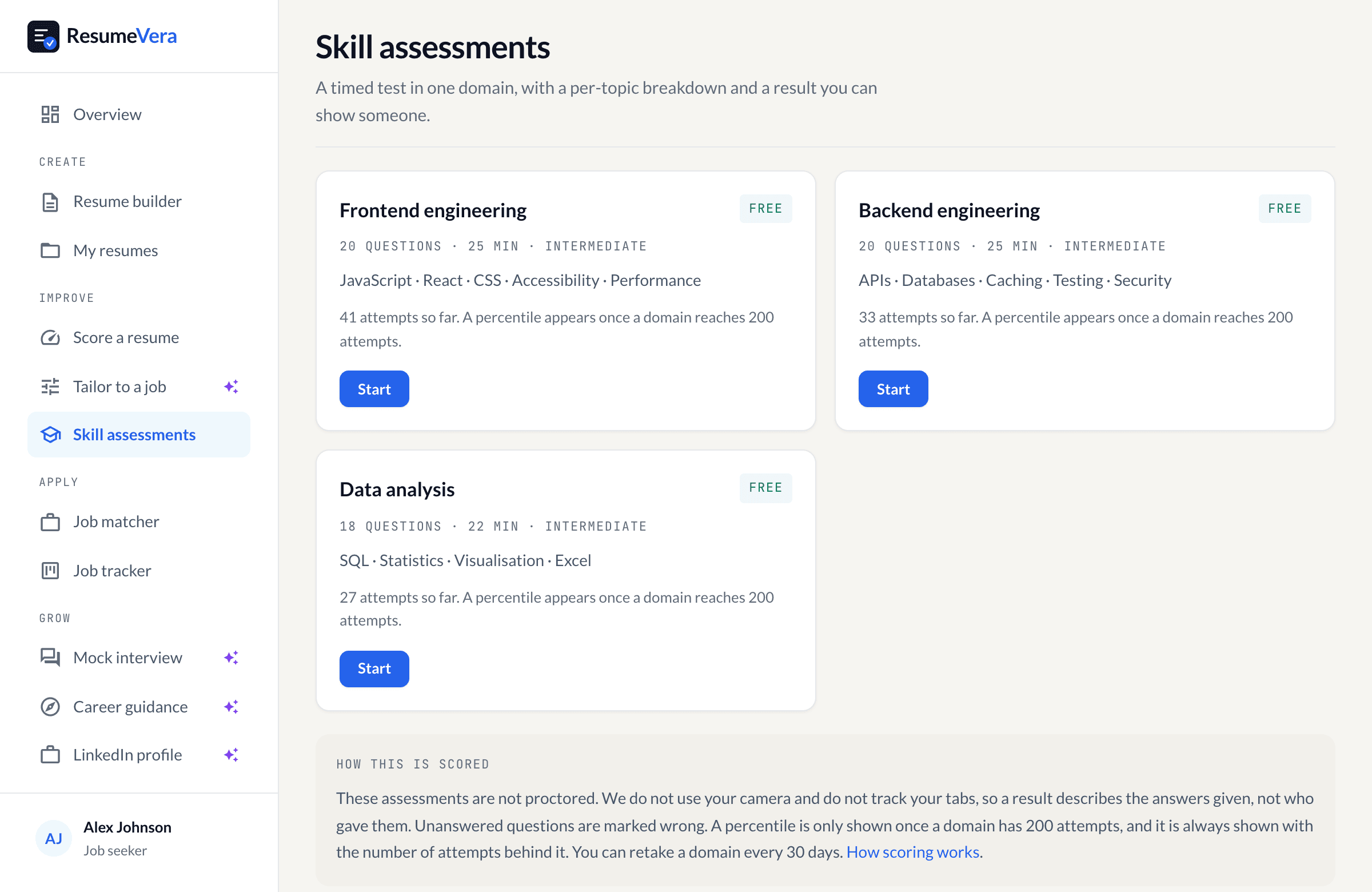
The real list. Percentiles stay hidden until a domain has enough attempts to mean anything.
Is your resume ATS-ready?
Run a free ATS score check and get specific improvements in under 60 seconds.