Frontend Developer Interview Questions 2026
22 real-world questions covering React 19, modern JavaScript, CSS layouts, web performance, accessibility, and frontend system design.
Interview Questions
22 Questions with Answers
Click any question to reveal a detailed sample answer. Filter by category to focus your preparation.
Explain the virtual DOM in React. How does reconciliation work?
Sample Answer
The virtual DOM is a lightweight JavaScript representation of the actual DOM. When state changes, React creates a new virtual DOM tree and compares it with the previous one using a diffing algorithm (reconciliation). It identifies the minimal set of changes needed and batches DOM updates for performance. React's Fiber architecture enables incremental rendering, allowing high-priority updates (user input) to interrupt lower-priority work (data fetching). React 19 introduces the React Compiler which automatically memoizes components, reducing unnecessary re-renders. Key optimization: React uses keys in lists to track element identity across renders, enabling efficient reordering without full re-creation.
What is the difference between useEffect, useLayoutEffect, and the new use hook in React 19?
Sample Answer
useEffect runs asynchronously after the browser paints, ideal for data fetching, subscriptions, and non-visual side effects. useLayoutEffect runs synchronously after DOM mutations but before the browser paints, used for DOM measurements and layout adjustments (prevents visual flicker). The React 19 use hook can read promises and context directly in the render phase, replacing many useEffect patterns for data fetching. It works with Suspense for loading states. Best practice: prefer use for data fetching (with Suspense), useEffect for subscriptions and event listeners, and useLayoutEffect only when you need synchronous DOM measurements before paint.
Explain closures in JavaScript. Give a practical example of a closure bug.
Sample Answer
A closure is a function that retains access to its outer scope's variables even after the outer function returns. This is fundamental to JavaScript's execution model. Common closure bug: in a loop with setTimeout, all callbacks share the same variable reference and see the final value. Fix with let (block scoping) or IIFE. Practical example: event handlers in React using stale state values because the callback closed over an old state value. Fix with useRef for mutable values or functional state updates (setState(prev => prev + 1)). Closures enable data privacy, function factories, partial application, and module patterns. They are the foundation of React hooks.
How does the event loop work in JavaScript?
Sample Answer
JavaScript is single-threaded with a concurrency model based on the event loop. The call stack executes synchronous code. When async operations complete, their callbacks go to the task queue (macrotasks: setTimeout, I/O) or microtask queue (Promises, MutationObserver). After the call stack empties, the event loop processes all microtasks first, then one macrotask, then repeats. This is why Promise.then runs before setTimeout(fn, 0). requestAnimationFrame runs before the next paint. Understanding this order is critical for debugging async behavior, preventing UI freezing (long tasks block the event loop), and optimizing performance. Use Web Workers for CPU-intensive tasks that would block the main thread.
Explain the CSS Box Model. What is the difference between content-box and border-box?
Sample Answer
The CSS Box Model wraps every element in content, padding, border, and margin layers. With content-box (default), width and height apply only to the content area; padding and border are added on top, making the total element size larger than specified. With border-box, width and height include content, padding, and border, making layouts more predictable. Best practice: use * { box-sizing: border-box } globally. This is why frameworks like Tailwind and Bootstrap set border-box by default. Understanding the box model is essential for debugging layout issues, especially with percentage widths, flexbox, and grid layouts.
When would you use CSS Flexbox vs CSS Grid?
Sample Answer
Flexbox is one-dimensional (row OR column), ideal for distributing space among items in a single direction: navigation bars, card rows, centering content, and flexible spacing. Grid is two-dimensional (rows AND columns), ideal for page layouts, image galleries, dashboard grids, and any layout requiring alignment in both dimensions simultaneously. They complement each other: use Grid for the overall page layout and Flexbox for components within grid cells. Grid excels at overlap (grid-area) and asymmetric layouts. Flexbox excels at dynamic content where item count varies. Both are fully supported in modern browsers with no need for float-based fallbacks.
What are React Server Components and when would you use them?
Sample Answer
React Server Components (RSC) render on the server and send HTML with zero JavaScript bundle cost to the client. They can directly access databases, file systems, and server-only APIs. Use RSC for data-heavy pages, SEO-critical content, and components that do not need interactivity. Client Components (marked with 'use client') handle interactivity, state, and browser APIs. The key benefit is reducing the JavaScript bundle sent to the client, improving Time to Interactive. In Next.js App Router, all components are Server Components by default. Best practice: keep interactivity at the leaf nodes, push 'use client' as far down the component tree as possible.
How would you optimize the performance of a slow React application?
Sample Answer
Start with measurement using React DevTools Profiler and Lighthouse. Common optimizations: memoize expensive calculations with useMemo, prevent unnecessary re-renders with React.memo and useCallback (though React 19's compiler handles this automatically), code-split with lazy loading and Suspense, virtualize long lists with react-window or TanStack Virtual, optimize images with next/image or responsive formats, reduce bundle size by analyzing with webpack-bundle-analyzer, and debounce expensive operations. Server-side: use React Server Components, implement streaming SSR, and cache API responses. Monitor Core Web Vitals (LCP, INP, CLS) as your primary performance metrics. Fix the biggest bottleneck first, not everything at once.
Explain the difference between == and === in JavaScript.
Sample Answer
=== (strict equality) compares both value and type without coercion. == (loose equality) performs type coercion before comparison, leading to unexpected results: '0' == false is true, null == undefined is true, '' == 0 is true. Always use === to avoid subtle bugs. The only exception where == is acceptable: checking for null or undefined with value == null (catches both). The abstract equality algorithm for == is complex and error-prone. ESLint's eqeqeq rule enforces strict equality. In TypeScript, the type system catches many issues that == would mask, making strict equality even more important for code clarity.
What is accessibility (a11y) in web development and how do you implement it?
Sample Answer
Web accessibility ensures all users, including those with disabilities, can use your application. Key practices: use semantic HTML (button, nav, main, article) instead of generic divs. Add ARIA attributes only when semantic HTML is insufficient. Ensure keyboard navigation works for all interactive elements (Tab, Enter, Escape). Maintain color contrast ratios (4.5:1 for normal text, 3:1 for large text per WCAG AA). Add alt text to images, labels to form inputs, and skip navigation links. Test with screen readers (NVDA, VoiceOver), keyboard-only navigation, and automated tools (axe, Lighthouse). Make modals trap focus and restore it on close. Accessibility benefits everyone, including users on slow connections or small screens.
Design a frontend architecture for a large-scale dashboard with real-time updates.
Sample Answer
Use a component-based architecture with clear separation: presentational components for UI, container components for data logic, and custom hooks for shared state. For real-time data, use WebSocket connections with automatic reconnection and exponential backoff. Implement state management with React Query or SWR for server state (caching, background refetching, optimistic updates) and Zustand or Redux Toolkit for client state. Use virtualization for large data tables. Implement code splitting per dashboard module. Design a chart component system using a library like Recharts or D3 with React integration. Add error boundaries per widget so one failure does not crash the entire dashboard. Use service workers for offline capability.
What is the difference between localStorage, sessionStorage, and cookies?
Sample Answer
localStorage persists data with no expiration, shared across all tabs of the same origin, with ~5-10MB capacity. sessionStorage persists only for the browser tab session and is cleared when the tab closes, also ~5-10MB. Cookies are sent with every HTTP request, have a 4KB limit, support expiration dates, and can be set as HttpOnly (inaccessible to JavaScript, preventing XSS theft) and Secure (HTTPS only). Use cookies for authentication tokens (HttpOnly, Secure, SameSite=Strict). Use localStorage for user preferences and cached data. Use sessionStorage for temporary form data or single-session state. Never store sensitive information in localStorage or sessionStorage as they are accessible to any JavaScript on the page.
Explain how you would implement authentication in a Next.js application.
Sample Answer
Use a session-based approach with HttpOnly cookies for security. On login, the API validates credentials and returns a session token in a Set-Cookie header with HttpOnly, Secure, and SameSite flags. In Next.js, use middleware (middleware.ts) to check authentication on every request and redirect unauthenticated users. Server Components can read cookies directly for server-side auth checks. For OAuth, use NextAuth.js (Auth.js) which handles Google, GitHub, and other providers with built-in CSRF protection. Store sessions in a database or Redis for server-side validation. Never use localStorage for auth tokens as it is vulnerable to XSS attacks. Implement token refresh and session expiration for security.
Tell me about a time you improved the performance of a web application significantly.
Sample Answer
Use the STAR method with specific metrics. For example: 'Our e-commerce product listing page had a Largest Contentful Paint of 4.2 seconds, hurting conversion rates. I profiled using Lighthouse and identified three main issues: unoptimized images, render-blocking JavaScript, and excessive third-party scripts. I implemented responsive images with WebP format and lazy loading, reducing image payload by 60%. I code-split the JavaScript bundle and deferred non-critical scripts. I moved analytics to a web worker. LCP dropped to 1.8 seconds, and we measured a 12% increase in conversion rate. I then set up a performance budget in CI to prevent regression.'
What is TypeScript and why would you use it over JavaScript?
Sample Answer
TypeScript adds static type checking to JavaScript, catching type errors at compile time rather than runtime. Benefits include: better IDE autocompletion and refactoring support, self-documenting code through type annotations, catching null/undefined errors early, and improved team collaboration on large codebases. Use generics for reusable type-safe components, interfaces for object shapes, and union types for flexible but safe values. Trade-offs: initial setup overhead, learning curve for advanced types, and slightly slower build times. For React, TypeScript types props, state, and hooks, preventing common bugs like passing wrong prop types. In 2026, TypeScript is the industry default for professional frontend development.
How do you handle state management in a large React application?
Sample Answer
Categorize state by scope: local component state (useState), shared UI state (Context + useReducer or Zustand), and server state (React Query or SWR). Server state management tools handle caching, background refetching, optimistic updates, and pagination, solving 80% of state management complexity. Avoid putting everything in global state; co-locate state with the components that use it. Use URL state (search params) for filterable and shareable views. For complex forms, use React Hook Form with Zod for validation. The trend is away from monolithic stores (Redux) toward purpose-specific state management. Key principle: the right tool for each type of state, not one tool for all state.
Explain CORS. Why does it exist and how do you handle CORS errors?
Sample Answer
Cross-Origin Resource Sharing (CORS) is a browser security mechanism that restricts web pages from making requests to a different domain than the one serving the page. It prevents malicious sites from making authenticated requests to your API using your users' cookies. When a cross-origin request is made, the browser sends a preflight OPTIONS request to check the server's CORS policy. The server responds with Access-Control-Allow-Origin headers. To fix CORS errors: configure the server to include proper CORS headers for your frontend domain, use a proxy in development (Next.js rewrites or webpack devServer proxy), and never use CORS wildcards (*) with credentials. Understanding CORS prevents security vulnerabilities and debugging headaches.
How would you implement a design system for a growing team?
Sample Answer
Start with an audit of existing UI patterns and identify inconsistencies. Define design tokens (colors, typography, spacing, shadows) as the foundation. Build atomic components (Button, Input, Badge) with clear props API, TypeScript types, and Storybook documentation. Follow compound component patterns for complex components (Tabs, Dropdown). Use CSS-in-JS or CSS Modules for scoped styling. Publish as an internal npm package with semantic versioning. Include accessibility testing (axe-core) in CI. Create contribution guidelines and a review process. Success metrics: design consistency across products, developer adoption rate, and time-to-build new features. Start small with the most-used components and iterate based on team feedback.
What excites you most about frontend development right now?
Sample Answer
Share genuine enthusiasm about current trends. For example: 'I am most excited about React Server Components and the shift toward server-first rendering, which fundamentally changes how we think about data fetching and JavaScript budgets. The convergence of build tools (Turbopack, Vite) making development faster, and the maturation of TypeScript as the default language. AI-assisted development tools are also transforming how we build UIs, from Copilot to design-to-code tools. What draws me to this role specifically is the opportunity to build performant, accessible UIs at scale using these modern approaches.' Connect your enthusiasm to the specific role and company.
Why are you interested in this frontend role specifically?
Sample Answer
Research the company's tech stack and product before the interview. Frame your answer around three things: the technical challenge (scale, performance, complexity), the product impact (how your frontend work affects users), and growth (what you will learn). For example: 'I am drawn to this role because your product serves millions of users, which means frontend performance directly impacts business metrics. Your tech stack with Next.js and TypeScript aligns with my strongest skills, and the opportunity to build accessible, high-performance UIs at this scale is exactly the challenge I am looking for. I am also excited about contributing to your design system and raising the bar for frontend quality across the team.'
How do you approach testing React components?
Sample Answer
Follow the testing trophy: mostly integration tests, fewer unit tests, and minimal E2E tests. Use React Testing Library (RTL) to test components from the user's perspective: query by role, label, and text rather than implementation details (class names, data-testid). Test user interactions (click, type, submit) and verify outcomes (text appears, API called, navigation happened). Mock API calls with MSW (Mock Service Worker) for realistic integration tests. Use Playwright or Cypress for critical user flows E2E. Test accessibility with jest-axe. Avoid testing implementation details like state values or component methods. Snapshot tests have limited value and generate noise. Focus testing effort on business-critical paths and complex logic.
What are Web Vitals and why should frontend developers care about them?
Sample Answer
Core Web Vitals are Google's metrics for user experience: Largest Contentful Paint (LCP) measures loading speed (good: under 2.5s), Interaction to Next Paint (INP, replaced FID) measures responsiveness (good: under 200ms), and Cumulative Layout Shift (CLS) measures visual stability (good: under 0.1). They directly impact SEO rankings and user satisfaction. Optimize LCP by preloading critical resources, optimizing images, and reducing server response time. Improve INP by breaking up long tasks, using web workers, and debouncing input handlers. Fix CLS by setting explicit dimensions on images and ads, and avoiding dynamic content injection above the fold. Monitor with web-vitals library and Google Search Console.
Preparation Tips
Interview Preparation Tips
Build a portfolio of React projects that demonstrate state management, API integration, responsive design, and performance optimization.
Practice coding without IDE autocompletion — many interviews use shared coding environments without TypeScript support.
Study JavaScript fundamentals deeply: closures, event loop, prototype chain, and async patterns are consistently tested.
Know your CSS: be ready to build layouts from scratch using Flexbox and Grid without relying on a CSS framework.
Prepare to discuss your approach to accessibility, testing, and performance optimization with specific examples.
Review React 19 features: Server Components, the use hook, Actions, and the React Compiler are increasingly tested in 2026 interviews.
Avoid These
Common Mistakes to Avoid
Memorizing React API without understanding the underlying JavaScript concepts that power it.
Not being able to explain why you chose a particular state management solution or rendering strategy.
Ignoring accessibility in your projects — it signals a lack of professional maturity to interviewers.
Over-engineering solutions: using Redux for a small app or Context for every piece of state.
Not preparing frontend system design answers — senior roles increasingly test this area.
Failing to discuss performance trade-offs when proposing solutions.
Related Roles
Explore Other Interview Guides
Preparing for multiple roles? Check out interview questions for related positions.
Interview Guides
Explore More Interview Questions
Browse all our interview question guides with detailed answers and preparation tips.
View All Interview GuidesPractise
Reading questions is not the same as answering them
A mock interview generates its questions from this role and from your own resume, then tells you what a hiring manager would take from each answer.
Join the waitlist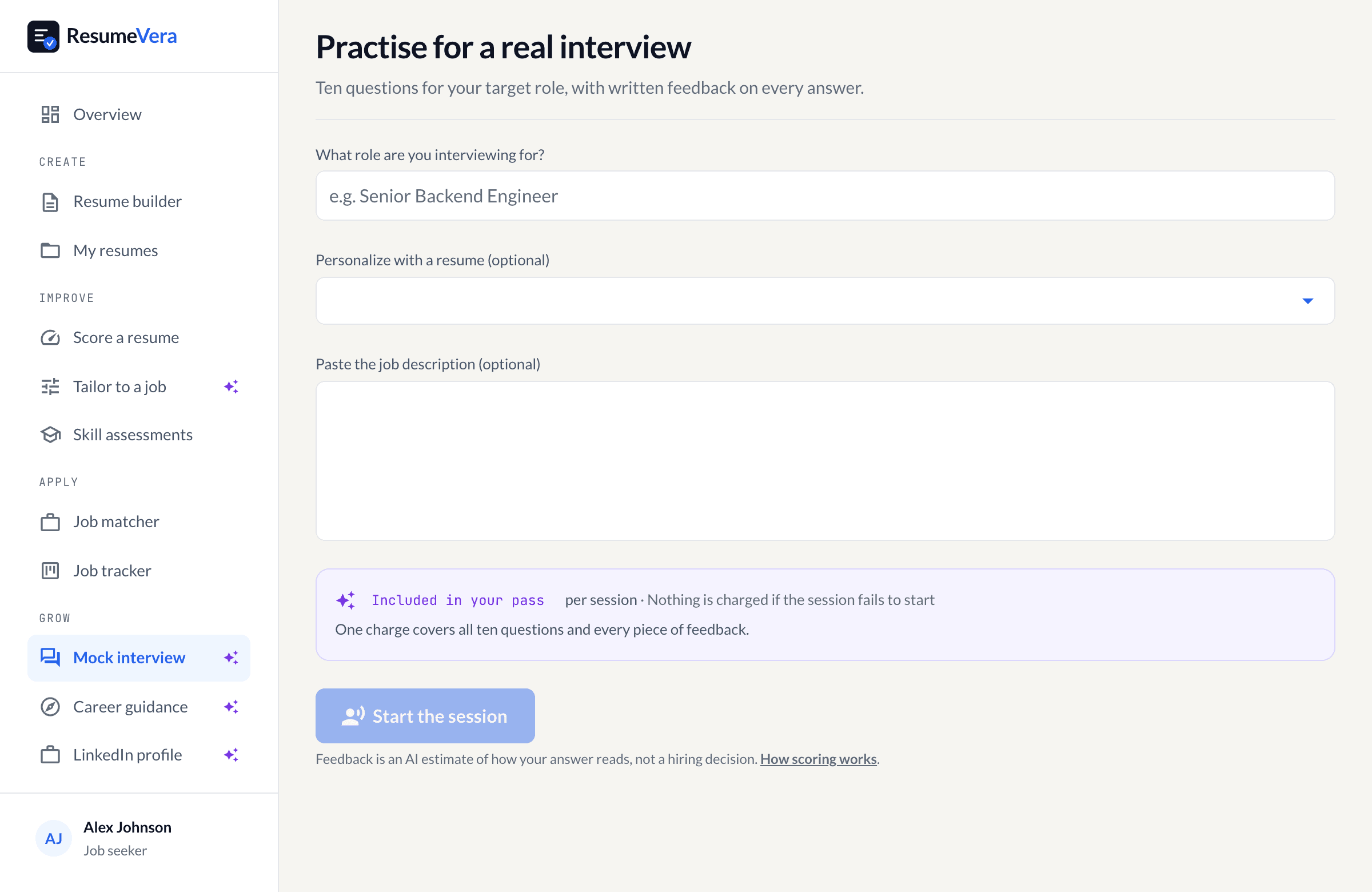
The real screen. Questions are generated from the role you pick and your own resume.
Is your resume ATS-ready?
Run a free ATS score check and get specific improvements in under 60 seconds.