Excel and Google Sheets
Spreadsheet skills from the basics to modelling, and how to show them on your resume with the work they made faster or more accurate.
Market Demand
Demand and salary data
Steady demand with Excel referenced in 41% of all job postings in 2026
Growth rate
Top industries
Learning Path
Skill levels
Beginner
Understand spreadsheet fundamentals: cell formatting, basic formulas (SUM, AVERAGE, COUNT, IF), sorting, filtering, and creating simple charts. Can build basic budgets, trackers, and data entry forms. Comfortable navigating both Excel and Google Sheets interfaces.
Intermediate
Proficient in advanced formulas (VLOOKUP, XLOOKUP, INDEX-MATCH, SUMIFS, COUNTIFS), pivot tables, conditional formatting, data validation, and named ranges. Can build dynamic dashboards, use Power Query for data transformation, create macros for repetitive tasks, and collaborate effectively in Google Sheets with shared workbooks.
Advanced
Expert in VBA/Apps Script automation, complex financial modeling, Power Pivot and DAX expressions, Monte Carlo simulations, array formulas (LAMBDA, MAP, REDUCE), and integration with external data sources via APIs. Can build enterprise-grade reporting templates, automated workflows, and train teams on spreadsheet best practices.
Section 01
Why Excel and Google Sheets skills still matter in 2026
Despite the rise of specialized analytics platforms and AI tools, Excel and Google Sheets remain core tools across the business world. In 2026, Excel still shows up in job postings in almost every industry.
Excel is used around the world, and Google Sheets is a common collaboration tool for startups, agencies, and remote teams. Together, these spreadsheet platforms form the foundation of business data analysis, financial modeling, project management, and operational reporting.
What makes spreadsheet skills especially valuable is their universality. Unlike specialized tools that are limited to certain roles, Excel and Google Sheets proficiency is relevant for data analysts, financial analysts, business analysts, marketers, operations managers, project managers, HR professionals, and virtually every office-based role. Employers value spreadsheet skills because they demonstrate analytical thinking, attention to detail, and the ability to work with data.
As businesses become increasingly data-driven, the ability to analyze, visualize, and present data in spreadsheets is no longer optional; it is a baseline expectation that can differentiate you in a competitive job market.
Section 02
How to list Excel and Google Sheets on your resume
Simply listing "Microsoft Excel" or "Google Sheets" in your skills section is not enough in 2026. Employers want to see specific proficiency levels and measurable impact. Here is how to effectively showcase your spreadsheet skills on your resume.
Resume Bullet Point Examples
Before (Weak):
- Proficient in Microsoft Excel
- Used spreadsheets for data entry and reporting
- Created charts and graphs in Google Sheets
After (Strong):
- Built automated financial reporting dashboard in Excel using Power Query and pivot tables, reducing monthly close reporting time from 3 days to 4 hours for a $50M revenue business unit
- Designed inventory forecasting model using XLOOKUP, SUMIFS, and Monte Carlo simulation in Excel, improving demand prediction accuracy by 23% and reducing stockouts by $180K annually
- Created Google Sheets-based project management system with Apps Script automation, custom dashboards, and Slack integration, adopted by 120+ team members across 5 departments
- Automated weekly sales reporting pipeline using Power Query and VBA macros, consolidating data from 8 regional spreadsheets into a single executive dashboard, saving 15 hours/week of manual work
Skills section format: Instead of just listing "Excel," specify your actual capabilities: Advanced Excel (Pivot Tables, Power Query, VBA, Financial Modeling), Google Sheets (Apps Script, Query Functions, API Integrations). This level of detail signals to recruiters that you have genuine expertise rather than basic familiarity, and it gives them the exact terms they may search for in their applicant tracking system.
Consider creating a separate "Technical Skills" or "Tools" section that groups your spreadsheet skills with complementary analytics tools like SQL, Tableau, or Power BI to present a complete data analysis toolkit.
Section 03
Excel vs. Google Sheets: which to highlight on your resume
Both Excel and Google Sheets are valuable, but the right emphasis depends on your target industry and role. Understanding the strengths of each platform helps you tailor your resume for maximum impact.
When to Emphasize Excel
Finance and banking: Excel remains the standard tool in financial services. Investment banks, private equity firms, and corporate finance teams rely on Excel for financial modeling, valuation, and complex calculations. If you're targeting finance roles, Excel proficiency (especially financial modeling and VBA) is non-negotiable.
Enterprise and corporate roles: Large corporations with Microsoft 365 ecosystems expect Excel proficiency. Skills in Power Query, Power Pivot, and integration with Power BI are particularly valued in enterprise settings.
Data-heavy analysis: For roles involving large datasets (100K+ rows), complex statistical analysis, or solver/optimization problems, Excel's desktop processing power and advanced features like Power Pivot and Data Model give it an edge.
When to Emphasize Google Sheets
Startups and tech companies: Google Workspace is a common productivity suite at startups and tech companies. Proficiency in Google Sheets, especially Apps Script automation and API integrations, is highly valued in these environments.
Remote and collaborative roles: Google Sheets' real-time collaboration features make it preferred for distributed teams. Highlighting your ability to build shared templates, automate workflows, and integrate with other Google Workspace tools demonstrates modern collaboration skills.
Marketing and operations: Marketing teams, growth hackers, and operations managers frequently use Google Sheets for campaign tracking, A/B test analysis, and operational dashboards due to its easy sharing and integration capabilities.
Best practice: List both on your resume unless the job description specifically mentions one. Use the format: "Microsoft Excel (Advanced) & Google Sheets (Advanced)" in your skills section to cover both bases.
Section 04
Advanced Excel skills worth learning
While basic Excel knowledge is expected, advanced skills open up career advancement opportunities. Here are the Excel and Google Sheets skills that set strong candidates apart in 2026.
Power Query and Data Transformation
Power Query has become essential for any role involving data from multiple sources. The ability to extract, transform, and load (ETL) data from databases, APIs, and files into clean, analysis-ready formats is a skill that saves teams a lot of time. Professionals who master Power Query can automate data preparation workflows that previously required manual copy-pasting.
Financial Modeling
Building three-statement financial models, DCF valuations, LBO models, and scenario analyses in Excel is a hallmark of experienced finance professionals. These skills are particularly valuable in investment banking, private equity, corporate development, and FP&A roles where financial modeling drives million-dollar decisions.
VBA and Apps Script Automation
The ability to write VBA macros in Excel or Apps Script in Google Sheets transforms you from a spreadsheet user to a workflow automation specialist. Professionals who can automate report generation, data validation, email notifications, and complex calculations stand out from those with only formula-level skills.
Dynamic Arrays and LAMBDA Functions
Excel's modern formula engine, including LAMBDA, MAP, REDUCE, FILTER, SORT, UNIQUE, and SEQUENCE functions, enables powerful calculations without VBA. Mastering these functions demonstrates cutting-edge Excel knowledge that impresses hiring managers. Google Sheets' QUERY function and ARRAYFORMULA serve similar purposes for Sheets-native workflows.
To showcase these advanced skills, include specific projects or achievements on your resume that demonstrate their application. Quantify the business impact wherever possible: hours saved, revenue generated, errors eliminated, or processes automated.
Section 05
Career paths for Excel and Google Sheets experts
Spreadsheet mastery opens doors to diverse career paths across industries. Here are the most common trajectories for professionals who build on their Excel and Google Sheets foundation.
Data Analyst Track
Data analysts use Excel and Google Sheets as their entry point into the analytics world. Starting with spreadsheet-based analysis, many progress to SQL, Python, and visualization tools. The data analyst career path typically progresses from Junior Data Analyst to Data Analyst to Senior Data Analyst to Analytics Manager. Excel proficiency is critical at every level, as many organizations still rely on spreadsheets for ad hoc analysis and executive reporting.
Financial Analyst Track
Financial analysts who master Excel's modeling capabilities are positioned for careers in investment banking, corporate finance, and private equity. The progression typically moves from Financial Analyst to Senior Financial Analyst to Finance Manager to Director of Finance. Advanced Excel financial modeling skills are a strict requirement at every stage.
Business Intelligence Track
Excel power users who learn Power Query, Power Pivot, and DAX often transition naturally into Power BI development and business intelligence roles. This path leverages your existing spreadsheet expertise while adding dashboard and data warehouse skills.
Operations and Process Improvement
Operations professionals who automate workflows with Excel VBA or Google Apps Script can transition into process improvement, lean management, or operations management roles. These positions value the ability to build systems that reduce manual work and improve efficiency across departments.
Regardless of the path you choose, spreadsheet skills provide a versatile foundation that transfers across industries and roles, making them a worthwhile skill to develop early in your career.
Related Roles
Roles that use this skill
Explore resume examples for roles that commonly require this skill.
Questions
Frequently asked questions
Skill Guides
Explore More Skills
Browse all our in-demand skill guides with demand data and learning paths.
View all skillsProve it
Claiming a skill and demonstrating one are different things
A timed assessment puts a result behind the word on your resume. Question count and duration are shown up front, and percentiles stay hidden until a domain has enough attempts to mean anything.
Join the waitlist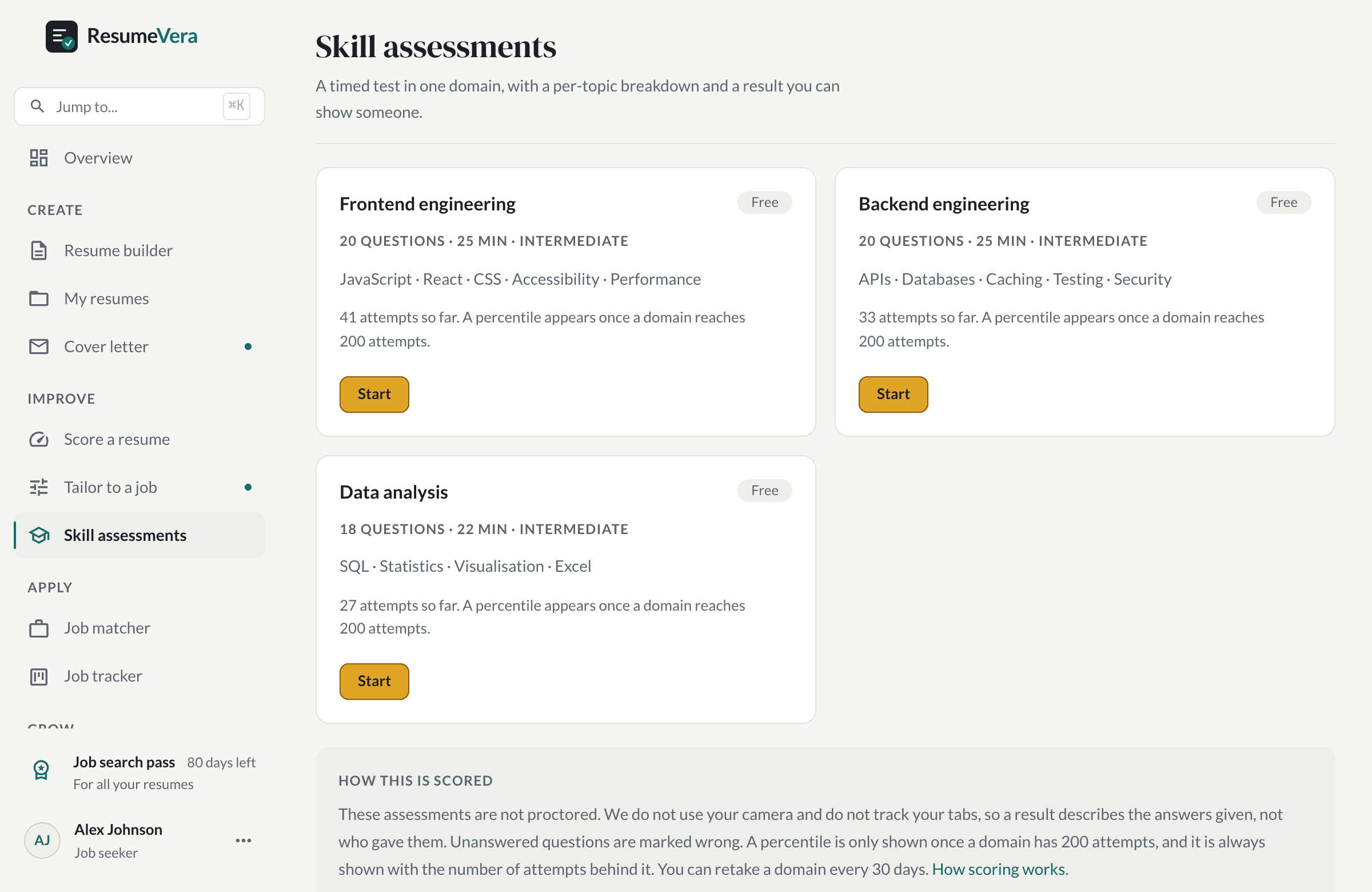
The real list. Percentiles stay hidden until a domain has enough attempts to mean anything.
Is your resume ATS-ready?
Run a free ATS score check and get specific improvements in seconds.