Figma
Figma skills from wireframes to design systems, and how to show design work on your resume and in a portfolio.
Market Demand
Demand and salary data
60% increase in design job postings year-over-year; 40% of hiring managers plan to expand design teams
Growth rate
Top industries
Learning Path
Skill levels
Beginner
Understand Figma fundamentals: frames, layers, auto layout, constraints, and basic components. Can create wireframes, simple UI layouts, and basic prototypes with transitions. Familiar with the collaboration features including comments, sharing, and version history. Can work with existing design files and component libraries.
Intermediate
Proficient in advanced auto layout, component variants and properties, interactive prototyping with smart animate, boolean operations, and design tokens. Can build responsive designs, create reusable component libraries, conduct design handoffs with developer annotations, and use Figma plugins effectively. Understands design system architecture and can contribute to existing systems.
Advanced
Expert in building and maintaining scalable design systems with nested components, variables, and modes (light/dark theme, responsive breakpoints). Can architect multi-brand design systems, create advanced interactive prototypes, implement design-to-code workflows with Dev Mode, manage design operations for large teams, and leverage Figma's API for custom plugins and integrations.
Section 01
Why Figma skills are essential for designers in 2026
Figma has become a standard tool for UI/UX design. In 2026, knowing Figma is no longer a competitive advantage. It is a baseline requirement for any product design role. Figma proficiency appears in a large share of UI/UX job descriptions.
What makes Figma popular is its browser-based collaborative model. Unlike traditional desktop design tools, Figma enables real-time multi-user editing, seamless developer handoff via Dev Mode, and cloud-based file management that eliminated the version control chaos of previous generations of design tools. This collaborative approach has made it a common choice for design teams of all sizes.
For job seekers, Figma expertise signals more than just tool proficiency. It demonstrates understanding of modern design workflows, design system thinking, and cross-functional collaboration. Companies evaluate designers not just on their visual output but on their ability to build scalable, maintainable design systems, prototype interactions, and communicate design decisions effectively through Figma's presentation and annotation features.
The bar for designers is rising: basic wireframing skills are no longer sufficient. Employers expect designers to demonstrate competency in component architecture, design tokens, responsive design patterns, and interactive prototyping, all within Figma.
Section 02
How to list Figma skills on your resume
For design roles, your resume must complement your portfolio. While your portfolio showcases visual work, your resume needs to demonstrate process, impact, and technical design proficiency. Here is how to effectively present your Figma skills.
Resume Bullet Point Examples
Before (Weak):
- Designed UI mockups in Figma
- Created wireframes and prototypes
- Used Figma for design work
After (Strong):
- Led the design and implementation of a comprehensive design system in Figma with 200+ reusable components, 48 component variants, and design tokens for 3 product brands, reducing design-to-development time by 40%
- Designed and prototyped the checkout flow redesign using Figma interactive prototyping, conducting 15 usability tests that validated design decisions and resulted in a 22% increase in conversion rate post-launch
- Built responsive component library with auto layout and variant properties for a B2B SaaS platform, enabling 8 designers to maintain visual consistency across 60+ product screens
- Created high-fidelity interactive prototypes in Figma for investor presentations, helping secure $5M Series A funding by demonstrating product vision and user experience across mobile and web platforms
Skills section format: Be specific about your Figma capabilities: Figma (Design Systems, Auto Layout, Interactive Prototyping, Dev Mode, Variables, Plugins), FigJam (Workshops, User Journey Mapping). If you also know other design tools, list them separately: Also proficient in: Adobe Creative Suite, Sketch, Framer, Principle.
For design roles, always include a link to your portfolio website and Figma community profile (if you've published community files or plugins). Many hiring managers will review your Figma files directly, so ensure your portfolio includes live Figma links alongside case study presentations.
Section 03
Building a Figma portfolio that gets you hired
Your Figma portfolio is often the deciding factor in landing a design role. Hiring managers and design leads review portfolios quickly, so every project must clearly communicate your skills, process, and impact.
Portfolio Project Types
1. Design System Case Study: Document how you built or contributed to a design system. Show the component architecture, naming conventions, variant structures, and design token organization. Explain the reasoning behind your decisions and the impact on team productivity. This is a strong project type for mid-level and senior roles.
2. End-to-End Product Design: Present a complete design project from research through final UI. Include user research findings, user personas, information architecture, wireframes, visual design iterations, interactive prototypes, and results metrics. Show your design thinking process, not just the final screens.
3. Mobile App Design: Design a native mobile experience (iOS or Android) demonstrating platform-specific patterns, gesture-based interactions, and responsive layouts. Mobile design skills remain useful because many products are built mobile-first.
4. Redesign with Results: Present a before-and-after redesign of an existing product with measurable outcomes. Show the research that identified problems, your design rationale, A/B test results, and metrics improvements (conversion rate, task completion time, user satisfaction scores).
Portfolio Presentation Tips
Host your portfolio on a personal website (not just Behance or Dribbble). Include 4-6 case studies with varying project types. For each project, follow the structure: Problem → Research → Process → Solution → Results. Include Figma prototype links so reviewers can interact with your designs. Write clear, concise case study narratives; hiring managers read text, not just scan images.
Ensure your portfolio itself demonstrates strong design skills. Clean typography, consistent spacing, logical information hierarchy, and responsive layout show that you practice what you preach. A poorly designed portfolio undermines even the strongest project work.
Section 04
Figma features every designer must master in 2026
Figma's feature set has expanded significantly, and staying current with its capabilities is essential for competitive designers. Here are the must-know features that separate job-ready designers from beginners.
Variables and Design Tokens
Figma Variables allow you to define design tokens (colors, spacing, typography, numbers, booleans) that can be scoped across modes (light/dark theme, brand variants, responsive breakpoints). Mastering variables demonstrates design system maturity and is increasingly expected in senior design roles. You should be able to create variable collections, define modes, and bind variables to component properties.
Advanced Auto Layout
Auto layout is the foundation of responsive Figma design. Beyond basic horizontal and vertical stacking, you need to understand: absolute positioning within auto layout frames, min/max width constraints, wrapping (flex-wrap), gap spacing, and nested auto layout structures. These skills are critical for building components that adapt seamlessly across screen sizes.
Component Architecture
Building scalable components requires expertise in: component variants (combining multiple properties into a single component), instance swapping, slot components, nested component composition, and boolean properties for toggling visibility. The ability to architect a component that serves multiple use cases without becoming unwieldy is a hallmark of senior designers.
Dev Mode and Design Handoff
Figma's Dev Mode bridges the gap between design and development. Designers who understand Dev Mode, CSS/code generation, spacing annotations, ready-for-dev status flags, and component documentation are more effective collaborators with engineering teams. This cross-functional skill set is increasingly valued in product design roles.
Interactive Prototyping
Advanced prototyping goes beyond click-through mockups. Master smart animate transitions, component-level interactions, scroll behaviors, overlays, conditional logic with variables, and multi-flow prototypes. Being able to create high-fidelity prototypes that simulate real application behavior reduces development miscommunication and accelerates product iteration cycles.
Stay current by following Figma's Config conference updates, community resources, and official documentation. Figma ships new features often, and staying ahead of new capabilities differentiates proactive designers.
Section 05
Career paths for Figma-proficient designers
Figma proficiency opens multiple career trajectories in the design industry. Understanding these paths helps you tailor your resume and skill development for long-term career growth.
Product Designer Track
A common career path for Figma-proficient designers. Product designers own the end-to-end user experience for digital products, from research and ideation through final UI delivery. The typical progression: Junior Product Designer → Product Designer → Senior Product Designer → Staff/Principal Designer → VP of Design. This track values breadth across UX research, interaction design, visual design, and design systems.
Design Systems Specialist
An emerging specialization. Design systems specialists build and maintain the component libraries, design tokens, documentation, and governance processes that ensure consistency across products. This role is common at mid-to-large companies with multiple product teams. Deep Figma expertise (variables, components, plugins) is essential.
UX Engineering / Design Technologist
Designers who can bridge Figma and code (HTML/CSS/React) are uniquely valuable. UX Engineers translate Figma designs into production-ready components, build interactive prototypes with real data, and maintain design-to-code consistency. This hybrid role is valued because it reduces translation loss between design and development teams.
Design Management
For designers who want to lead teams, the management track progresses from Design Lead to Design Manager to Director of Design to VP of Design. While Figma skills remain important for design managers (to review work, provide feedback, and maintain design standards), the emphasis shifts to leadership, team building, design strategy, and cross-functional collaboration.
Regardless of your chosen path, continuous Figma skill development and a strong portfolio remain essential for career advancement. The design industry rewards demonstrated craft and impact over credentials alone.
Related Roles
Roles that use this skill
Explore resume examples for roles that commonly require this skill.
Questions
Frequently asked questions
Skill Guides
Explore More Skills
Browse all our in-demand skill guides with demand data and learning paths.
View all skillsProve it
Claiming a skill and demonstrating one are different things
A timed assessment puts a result behind the word on your resume. Question count and duration are shown up front, and percentiles stay hidden until a domain has enough attempts to mean anything.
Join the waitlist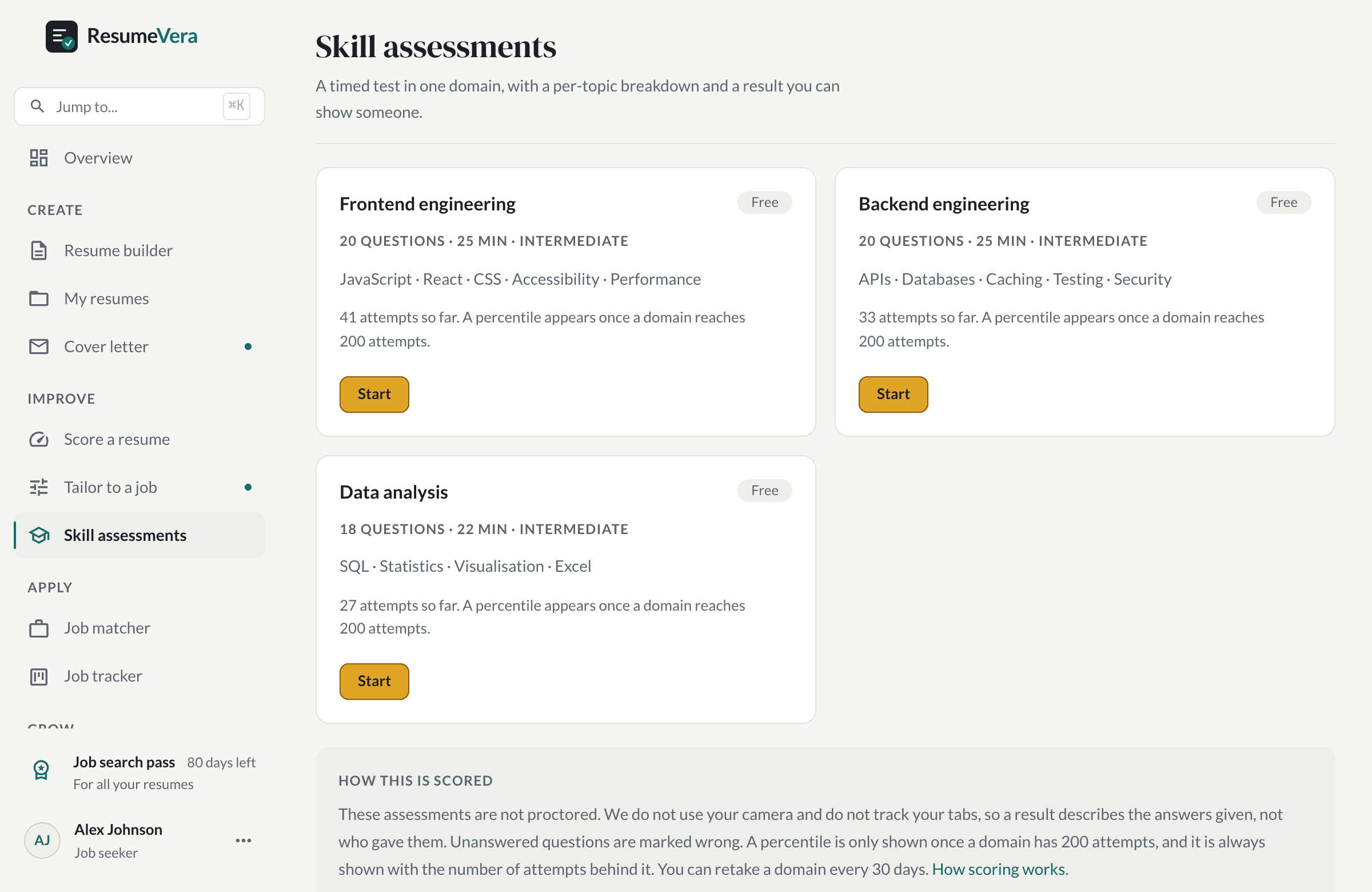
The real list. Percentiles stay hidden until a domain has enough attempts to mean anything.
Is your resume ATS-ready?
Run a free ATS score check and get specific improvements in seconds.